
The Split-Plane Protocol: How to Prompt True Cinematic Parallax in AI Video
Most AI video engines treat 'parallax' as a generic buzzword, resulting in flat pans or warped backgrounds. Discover the Split-Plane Protocol: a physical, three-layer prompting framework that forces AI models to render true spatial depth.
In traditional cinematography, a lateral tracking shot is a fundamental tool for establishing scale, depth, and spatial geometry. When a physical camera moves along a dolly track, foreground elements naturally sweep past the lens at high speeds, while the distant background shifts at a slow crawl. This phenomenon—known as parallax—instantly signals depth to the human eye, transforming a flat image into a three-dimensional environment.
However, when filmmakers transition to generative AI platforms, prompting this classic camera movement often yields frustrating results. Simply typing "cinematic parallax" or "lateral camera track" typically produces a flat, two-dimensional pan, or worse, a warping effect where the background melts and clings to the foreground subject. At Montagea, our testing shows that AI models require a mechanical, physics-based approach to prompting rather than reliance on cinematic buzzwords. To achieve true spatial dimension, creators must treat the AI camera as a physical rig operating within a multi-layered environment.
The Physics of Depth: Why AI Video Engines Struggle with Parallax
To understand why AI video generators struggle with parallax, it helps to look at how these models process movement. True parallax requires the camera to physically shift its position along an axis (a dolly or truck movement). This physical translation changes the camera's angle of view relative to objects at varying distances. The foreground elements must move across the frame much faster than the background elements, requiring the engine to constantly calculate "occlusion"—the way foreground objects reveal and hide different parts of the background as the camera moves.
AI video generators often default to a simple "pan" (rotating the camera on a fixed tripod) because it requires significantly less computational calculation of hidden geometry. In a pan, the spatial relationships between objects remain static; the engine only needs to slide the entire 2D canvas left or right. When forced to move laterally without explicit depth instructions, AI models frequently "melt" or warp background structures. Because the model lacks a native 3D spatial map of the environment, it attempts to stretch existing pixels rather than generating the previously hidden background details that a real physical camera movement would expose.
The Split-Plane Prompting Framework
To bypass the limitations of simple pan-and-scan generation, we use the Split-Plane Prompting Framework. This technique forces the AI to treat the frame as three distinct layers of depth, each with its own independent velocity and physical characteristics. Instead of hoping the model infers depth, you explicitly define the boundaries between these layers.
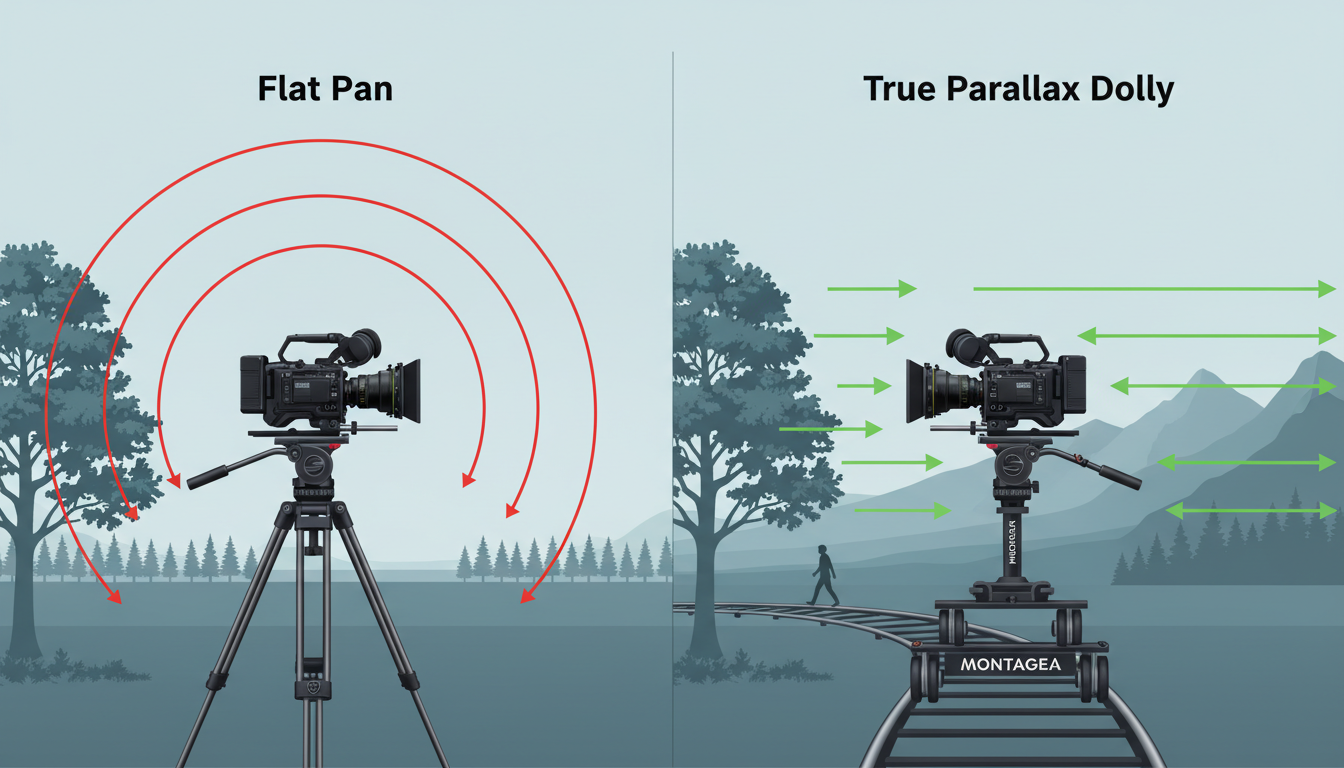
The core of this framework is the three-layer rule: every prompt designed for lateral motion must explicitly define a foreground obstacle, a midground subject, and a distant background. By introducing physical occlusion elements—such as vertical pillars, hanging tree branches, or window frames—in the immediate foreground, you force the AI engine to render sharp depth boundaries. The engine is compelled to slide the foreground element rapidly across the frame while keeping the midground subject in focus and the background relatively stable.
To make the spatial layers even more distinct, filmmakers can combine parallax prompts with a deliberate rack focus, a technique explored in our guide on prompting realistic rack focus in AI video.

To see the difference this framework makes, compare these two prompting approaches:
| Prompt Style | Example Prompt Text | Resulting AI Camera Behavior |
|---|---|---|
| Generic Prompt | "Cinematic parallax tracking shot of a man walking down a city street, 4k, realistic." | A flat, horizontal pan. The buildings in the background move at the exact same speed as the man, making the scene look like a flat 2D backdrop. |
| Split-Plane Prompt | "A lateral dolly shot tracks parallel to a man walking down a city street. In the immediate foreground, dark out-of-focus metal streetlamps sweep rapidly past the camera. In the midground, the man remains in sharp focus. In the far distance, towering skyscrapers shift slowly, maintaining their geometric proportions." | True cinematic parallax. The fast-moving foreground elements create a powerful sense of depth, while the background remains stable and structurally sound. |
Defining the Depth Strata: Foreground, Midground, and Background
Executing the Split-Plane Protocol successfully relies on using highly specific descriptive tokens that dictate the motion behavior of each layer. You cannot simply name the objects; you must describe their physical behavior in relation to the camera lens.
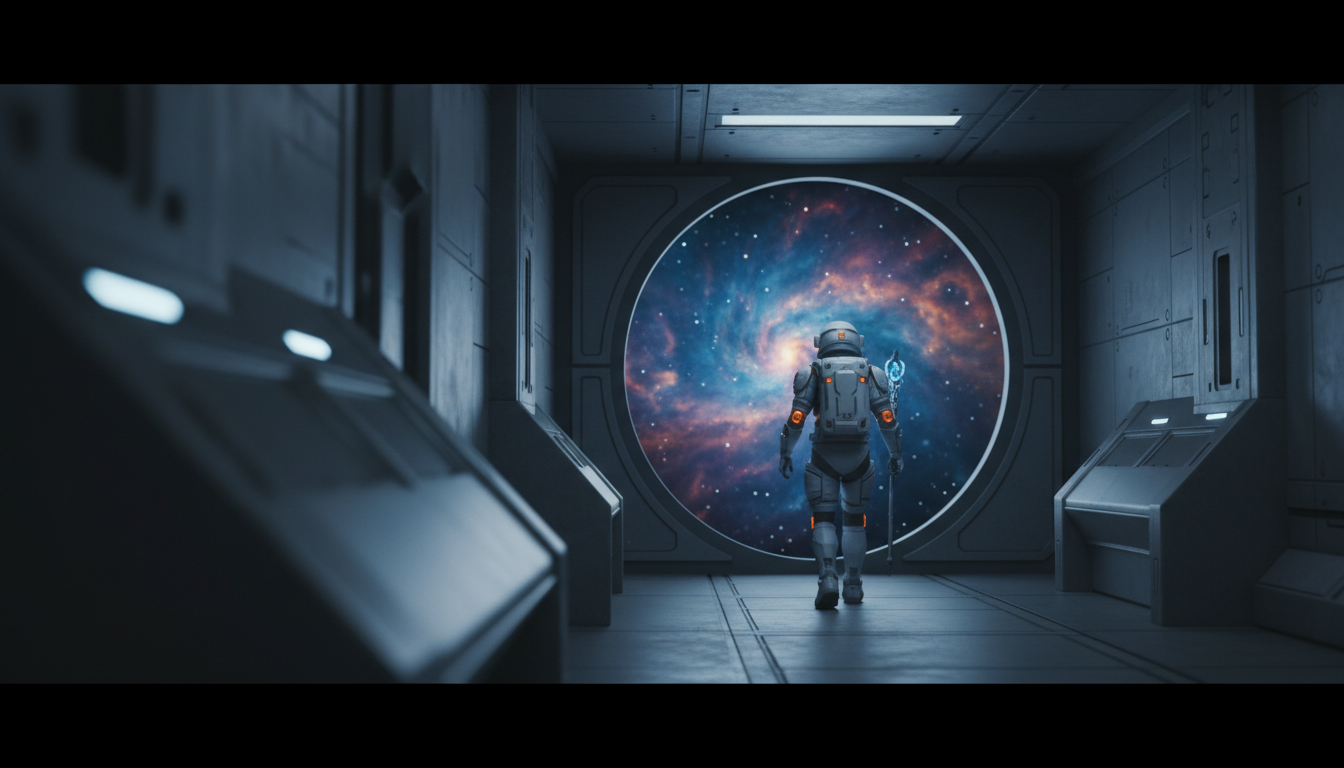
Crafting the Three-Layer Prompt Formula
When writing your prompt, divide your environmental description into three distinct strata using these targeted tokens:
- Foreground Tokens (High Velocity, Out of Focus): Use terms like "immediate foreground," "sweeps rapidly past the lens," "highly defocused," "motion-blurred," and "partially occluding the frame." Excellent physical objects for this layer include foliage, architectural pillars, fence posts, or interior doorways.
- Midground Tokens (Synchronized Velocity, Sharp Focus): Use terms like "tracks parallel to," "medium distance," "sharp focal plane," and "maintains consistent distance from the camera." This is almost always where your primary subject or character resides.
- Background Tokens (Low Velocity, High Stability): Use terms like "in the far distance," "shifts imperceptibly," "slowly parading," "receding perspective," and "rigid structural geometry." Use massive, distant structures like mountain ranges, distant city skylines, or celestial bodies to anchor this layer.

Combining Parallax with Complex Camera Vectors
Once you have mastered simple horizontal parallax, you can begin layering lateral tracking with other camera vectors to build complex, high-end cinematic shots. One of the most dramatic combinations is the synthetic Dolly-Zoom (the Vertigo effect). To prompt this, you must instruct the camera to physically move backward while simultaneously prompting the lens to zoom in (or vice versa). By defining your Split-Plane layers, the foreground will rapidly expand or compress while the midground subject remains perfectly locked in place.
While lateral parallax builds environmental scale, you can contrast this with the intimate tension of a slow push-in, which uses forward camera vectors to draw the audience closer to a subject. Alternating between lateral parallax tracking shots and slow forward push-ins is an excellent way to maintain visual variety and narrative pacing in an AI-generated sequence.
Additionally, do not limit your parallax shots to the horizontal plane. For vertical parallax, where foreground elements shift against the ground plane, mastering the prompts for authentic crane and jib shots will elevate your camera work beyond simple horizontal tracking. This vertical movement is highly effective when showcasing tall architectural spaces, dense forests, or dramatic cliff faces.
Troubleshooting Artifacts: Warping, Melting, and Perspective Drift
High-motion lateral shots are among the most taxing tasks for modern diffusion models. Common errors include "background drag" (where the background clings to the foreground subject and moves with them) and environmental tearing. To combat these issues, follow this practical troubleshooting checklist:
- Adjust Motion Parameters: In engines like Runway Gen-3 or Luma Dream Machine, high motion values often cause structural tearing. Keep your motion strength slider at a moderate level (typically between 3 and 5). This allows the engine to render smooth lateral movement without forcing the background to hallucinate too quickly.
- Introduce High-Contrast Lighting: AI engines separate depth layers based on contrast and edge detection. By prompting high-contrast lighting—such as strong rim lighting on your midground subject or a dark, silhouette-style foreground—you help the model identify where one depth layer ends and another begins.
- Lock the Seed for Iteration: If you get a shot with perfect parallax but a slightly warped background, lock the seed and subtly adjust your background tokens. Emphasize words like "solid," "immobile," or "rigid geometry" to force the model to stabilize those pixels across frames.
By applying the Split-Plane Protocol, filmmakers can transform flat, AI-generated pans into rich, dimensional tracking shots. Treating the camera as a physical tool and the scene as a physical space is the key to unlocking true cinematic quality in AI-assisted video production.



