
Simulating Weight and Arc: How to Prompt Authentic Crane and Jib Shots in AI Video
Stop settling for weightless, floaty drone footage when your scene demands a cinematic crane shot. Learn the precise mechanical prompt formulas and motion-control workflows needed to simulate gravity, leverage, and sweeping arcs in AI video.
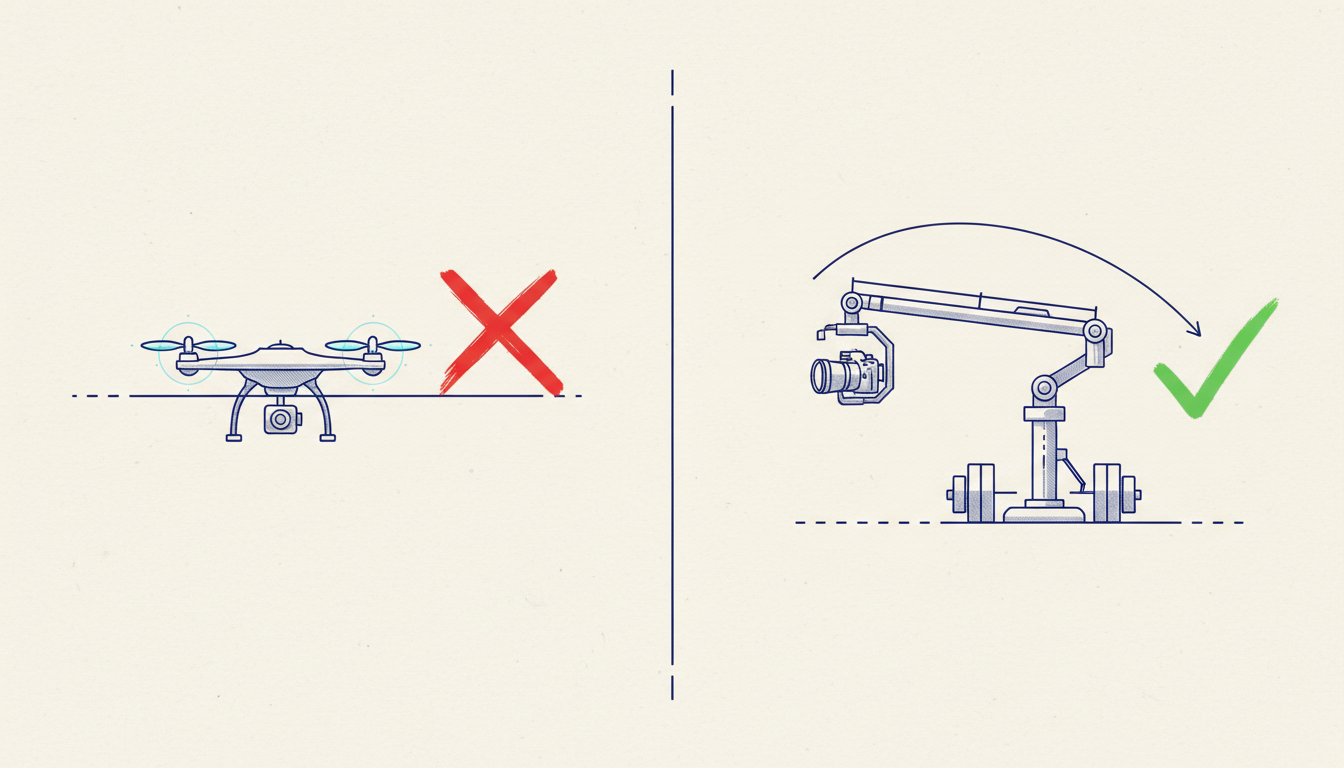
In traditional cinematography, a crane shot is defined by its physical gravity. The heavy metal arm of a jib or crane pivots from a fixed base, sweeping the camera through a mathematically perfect, weighted arc that anchors the audience’s perspective. When we translate this to generative AI, however, the physical reality is lost; AI video models do not inherently understand weight, leverage, or the mechanical tension of steel.
Instead, a simple prompt like "crane shot" almost always defaults to a weightless, linear drone flyover. To achieve a true cinematic crane movement in AI filmmaking, directors must learn to prompt the physical constraints of the rig itself. By describing the pivot, the counterweight, and the shifting ground plane, you can force the spatial engine to produce grounded, high-value camera physics.
The Physics of the Jib: Why AI Struggles with Crane Shots
A real camera crane or jib is bound by physical pivot points, gravity, and mechanical counterweights. As the arm lifts, the camera does not merely travel upward in a straight vertical line; it sweeps along a radial curve. This mechanical constraint creates a natural, shifting perspective where the background and foreground compress and expand in a very specific, predictable manner. The camera head tilts to compensate for the height change, maintaining a deliberate relationship with the subject.
AI generators like Runway, Luma, and Sora lack physical intuition. They are trained on vast datasets of video footage where aerial perspectives are increasingly dominated by lightweight consumer drones. Consequently, when a prompt requests a "crane shot," the AI's pattern-matching engine defaults to the linear, ungrounded physics of a drone flight path. The result is a floaty, detached movement that lacks the deliberate, heavy-set feel of a studio-grade production.
To break this "drone look," filmmakers must introduce prompt-based constraints that simulate mechanical resistance. We must describe the camera's relationship to the ground plane, the deliberate deceleration at the apex of an arc, and the subtle, counterbalanced tilt of the camera head. By grounding the prompt in mechanical vocabulary, we instruct the AI to respect the physical limitations of a real-world camera rig.
The Multi-Axis Formula: Prompting Crane Mechanics
Achieving a believable crane movement requires moving past simple directional commands. Generic terms like "crane up" or "jib down" do not give the AI enough structural context. Instead, we must use multi-axis formulas that combine the vertical ascent of the arm with the rotational tilt of the camera head.
The Counterbalanced Tilt
A classic jib movement involves raising the camera arm while tilting the camera head downward to keep a subject centered. This dual-axis movement creates a powerful sense of depth and scale. To prompt this, specify the mechanical relationship between the movement and the subject. Use the following formula:
[Base Scene Description] + [Mechanical Camera Action] + [Focal Anchor] + [Speed and Weight Details]
For example, instead of writing "crane shot of a detective," use:
"A mechanical crane shot rising slowly over a rain-slicked urban street. The camera pivots on a heavy jib arm, ascending from eye-level to a high-angle 20-foot elevation, tilting downward in a smooth, counterbalanced sweep to maintain a tight, locked focus on a detective standing under a streetlamp."
The High-Angle Plunge
The reverse movement—descending from a high vantage point to an intimate close-up—requires the AI to manage rapid changes in environmental scale. For wider, horizontal reveals that pull straight back rather than lifting vertically, explore our guide on prompting cinematic pull-back reveals in AI video.
When prompting the vertical plunge, emphasize the mechanical deceleration of the rig:
"A heavy camera crane plunges downward in a sweeping arc, decelerating smoothly as it approaches a close-up of a handwritten letter on a wooden desk. The perspective shifts from a bird's-eye view to an intimate macro shot, simulating the physical weight of a counterbalanced camera rig."
Crane vs. Drone vs. Dolly Zoom: Choosing the Right Vertical Camera Movement
Choosing the right vertical movement is a matter of emotional intent and physical grounding. While a drone offers infinite spatial freedom, it often feels detached and clinical. A crane, by contrast, offers intimate, controlled proximity to the subject, retaining a tangible connection to the physical space. The table below outlines when to use each movement type in your production:
| Movement Type | Physical Grounding | Emotional Impact | Prompting Difficulty | Best Used For |
|---|---|---|---|---|
| Crane / Jib Shot | High (Anchored to a physical pivot point) | Grounded, sweeping, cinematic reveals | Moderate (Requires mechanical prompting) | Establishing scenes with central characters |
| Drone Flyover | Low (Weightless, infinite spatial movement) | Epic scale, detachment, isolation | Easy (AI defaults to this naturally) | Vast landscapes and high-altitude establishing shots |
| Dolly Zoom (Vertigo) | High (Optical distortion on a fixed track) | Psychological tension, shock, realization | High (Requires precise focal-length prompting) | Character-driven emotional turning points |
If you want to combine vertical movement with optical distortion for a psychological effect, learn how to write precise AI dolly zoom prompts. Understanding these distinctions allows you to select the precise tool for your narrative goals, ensuring your AI-generated scenes carry the appropriate psychological weight.
Troubleshooting AI Crane Prompts: Correcting Drift, Scale, and Continuity
As a camera moves vertically through a generated space, AI engines struggle to maintain spatial continuity. The shifting angle forces the model to generate entirely new perspectives of characters and environments. This often results in character warping, shifting clothing textures, or melting background geometry.
To prevent your subject from warping as the camera moves from eye-level to a high angle, implement our workflow for maintaining AI character consistency across close-ups and wide shots. Additionally, maintaining the subject's gaze during a sweeping camera arc is critical; you can master this by studying spatial continuity workflows for AI filmmaking.
To minimize environmental drift during a complex sweep, always anchor your prompt with a fixed focal point and specify a slow, deliberate speed. Fast camera movements invite more generation errors, whereas slow, weighted mechanical movements give the AI's temporal layers room to render consistent details across frames. Keep your environmental details simple and clear to prevent the background from morphing as the perspective shifts.
The Montagea Workflow: Combining Camera Prompts with Motion Controls
While raw text prompts are powerful, relying solely on text to simulate complex physical mechanics can lead to unpredictable results. At Montagea, we believe the future of AI filmmaking lies in the hybrid workflow: combining highly descriptive prompt language with precise, UI-driven motion controls.
By utilizing Montagea's advanced motion settings, you can manually dictate the camera's path, bypassing the AI's tendency to generate weightless drone movements. This structured workflow ensures every frame feels deliberate and grounded:
- Set the Base Scene: Define your subject, lighting, and environment in the text prompt, keeping the camera movement description minimal.
- Apply Negative Zoom: Use a slight negative zoom setting to simulate the physical extension of a crane arm moving backward as it lifts.
- Configure Tilt and Pan: Adjust the manual Tilt and Pan sliders in Montagea to force a multi-axis mechanical arc. For a rising crane shot, set a positive vertical tilt paired with a subtle horizontal pan.
- Calibrate Motion Strength: Lower the overall motion strength parameter. This introduces simulated inertia, preventing the camera from accelerating too quickly and maintaining the illusion of a heavy, professional rig.
This hybrid approach empowers independent filmmakers to achieve studio-grade camera movements without the need for expensive physical rigs or unpredictable raw prompting. By blending mechanical terminology in your prompts with Montagea's precise motion engine, you can ground your visual storytelling in a believable, cinematic reality.
Why does my AI crane shot look like a weightless drone shot?
AI video generators are trained on massive amounts of drone footage, which is highly prevalent online. Without specific mechanical constraints in your prompt, the AI defaults to this weightless, linear drone movement. To fix this, you must explicitly prompt the physical mechanics of a crane, such as a "pivoting jib arm" and a "counterbalanced camera tilt."
What are the best prompt keywords to simulate a mechanical camera jib?
Use terms that imply physical weight and mechanical constraints. Highly effective keywords include: "heavy camera jib," "counterbalanced tilt," "pivoting on a mechanical arm," "sweeping radial arc," "deliberate deceleration," and "grounded camera base."
How do I prevent character distortion during a high-angle AI crane sweep?
To prevent warping as the camera perspective shifts, anchor the camera's target in your prompt (e.g., "camera maintains tight focus on the subject's face throughout the arc"). Additionally, keep the movement slow and utilize specialized character consistency workflows to lock in features across frames.
Can I control the speed of a crane shot in AI video generators?
Yes. In your text prompt, use phrases like "slow, deliberate sweep" or "smooth deceleration." For the best results, use Montagea's manual motion strength controls to physically dial down the camera's speed and simulate real-world inertia.



