
Planning AI Video Transitions: Shot Continuity and Multi-Engine Workflows
Achieving seamless visual flow in AI filmmaking requires moving transitions from post-production into pre-production. Discover how to coordinate match cuts, latent morphs, and scale zooms across collaborative, multi-engine pipelines.
Seamless AI video transitions require a shift from post-production editing to pre-production planning, specifically by embedding geometry, motion vectors, and color anchors directly into your generative prompts. Instead of relying on traditional cross-dissolves, professional AI filmmaking workflows utilize match cuts, latent morphs, and scale zooms baked directly into the generation process. However, executing these transitions requires precise coordination when working in collaborative, multi-engine pipelines where different shots are generated using different AI models. By planning these visual handoffs during the storyboarding and scene-splitting phases, creators can maintain tight visual continuity across diverse render engines.
The Evolution of Video Transitions in AI Filmmaking
In traditional filmmaking, transitions are typically executed during post-production. Editors use cuts, dissolves, wipes, or digital effects to bridge the gap between two independently captured shots. However, applying these traditional methods to AI-generated video often results in a visual disconnect. Because AI models generate motion on a frame-by-frame basis, a simple cross-dissolve can feel layered on top of the footage rather than integrated into the physical space of the scene.
Generative transitions, by contrast, are baked directly into the generation process. They utilize the latent space of AI models to morph, scale, or match geometry dynamically. This approach allows the environment, lighting, and subjects to transform fluidly, creating a more immersive and cohesive visual flow.
This generative approach becomes critical in collaborative environments like Montagea. Because Montagea allows creators to split a story into distinct scenes and invite a crew to render individual shots using the best engine for each task—such as Kling, WAN, or Veo—planning transitions in the scene brief is essential. Without upfront planning, a shot rendered on one engine may feature motion vectors or framing that cannot cleanly align with a subsequent shot rendered on a different model.
Three Core Generative Transition Workflows
To successfully execute transitions across different AI engines, filmmakers rely on three primary methodologies. Each requires a distinct prompting strategy and a clear understanding of the underlying model physics.
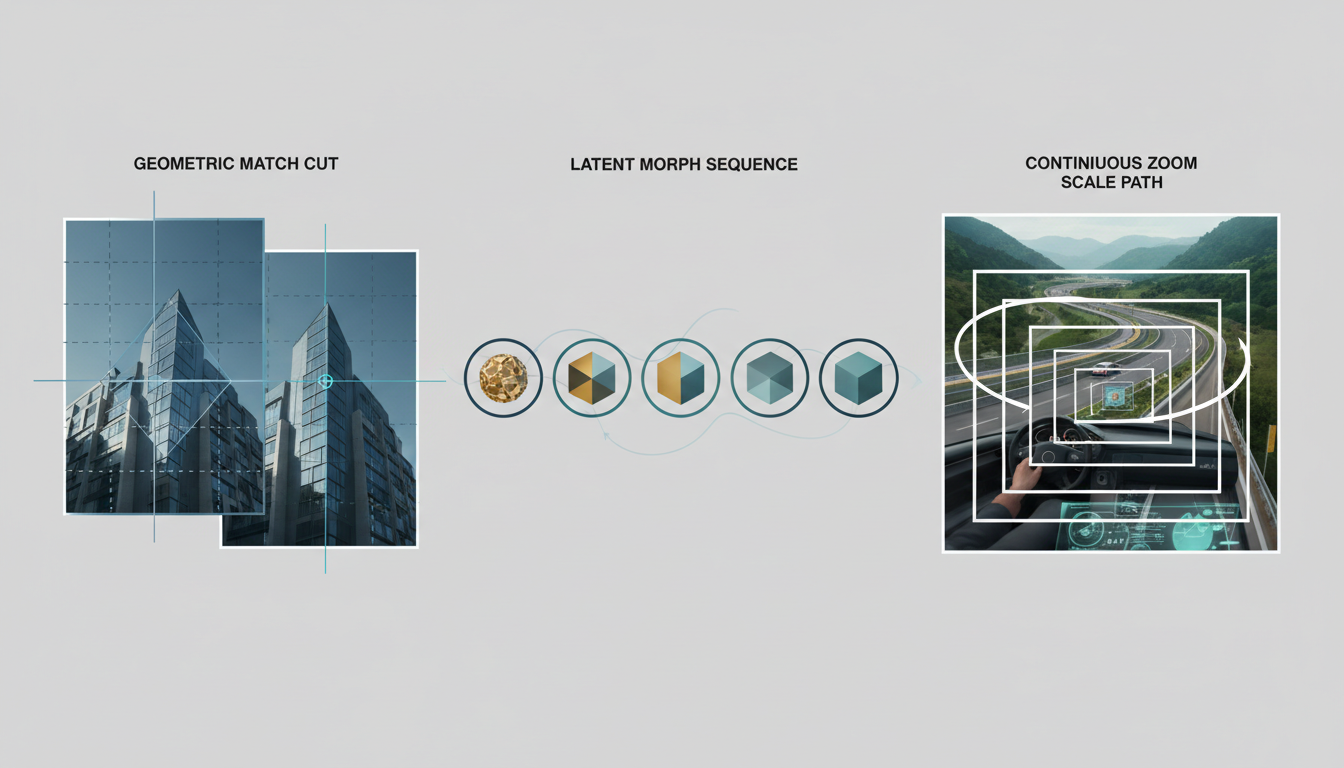
1. The Match Cut
The match cut relies on aligning screen geometry, color vectors, or character motion across the edit point. By matching the composition of the outgoing shot with the incoming shot, you create a psychological bridge that makes the cut feel natural to the viewer. For example, a close-up of a circular jade pendant can transition into a wide shot of a circular stone archway.
When prompting a match cut, you must specify the exact geometric placement of the focal object in the scene briefs for both shots. To master the spatial mechanics of this technique, refer to our detailed guide on The Geometry of the Cut: Prompting Seamless Match Cut Transitions in AI Video Production.
2. The Latent Morph
A latent morph uses image-to-image (I2I) workflows to smoothly transform one subject or environment into another. Instead of a hard cut, the AI model guides the transition by gradually shifting the latent noise states from the source image to the target image. This is highly effective for surreal sequences, historical transitions, or showing the passage of time on a character's face.
To execute this successfully across different engines, you must carefully control the denoising strength. Setting the denoising level too high causes the model to ignore the source frame's structure, while setting it too low prevents the new subject from fully forming. For a step-by-step technical breakdown of this process, consult The Latent Morph Protocol: Engineering Seamless Image-to-Image Transitions in AI Video.
3. The Scale Zoom
The scale zoom transition uses continuous forward (zoom-in) or backward (zoom-out) camera movement to bridge perspectives. This workflow is ideal for moving from a macro view to a micro view—such as zooming into a character's eye and transitioning into a completely different landscape reflected within it.
Achieving this requires consistent camera motion prompts across both shots. If the first shot ends with a rapid push-in, the second shot must begin with a matching rapid push-in from the new perspective. For a comprehensive look at setting up these continuous camera paths, explore our guide on The Cosmic Scale Protocol: Prompting Seamless AI Earth Zoom Transitions.
Managing Transition Continuity Across Collaborative Handoffs
When multiple contributors are rendering scenes for a single project, maintaining transition continuity requires structured guidelines. Without a unified framework, subtle differences in frame rates, lighting angles, and motion speed can ruin the illusion of a seamless transition.
To prevent these issues, production teams should implement the following three-step framework during the pre-production and review phases:
- Establish Shared Visual Anchors: Before any rendering begins, define the core visual elements in the scene briefs. This includes specifying a shared color palette, a consistent lighting angle (e.g., key light from the camera left at 45 degrees), and key props that must remain identical across the cut.
- Define Entry and Exit Frames: Clearly communicate the starting and ending states for adjacent shots. If Shot A must transition into Shot B via a match cut, the contributor rendering Shot A must deliver a file where the final frame matches the composition of the first frame of Shot B.
- Perform a Technical Quality Control Check: Before accepting a contributor's render, verify that the technical specifications match the project requirements. This prevents issues where a 24fps shot from one engine is paired with a 30fps shot from another, which can disrupt the timing of the transition.
To streamline this review process, teams should utilize a standardized checklist. The table below outlines the key parameters to verify before approving transition shots:
| Transition Parameter | Verification Requirement | Common AI-Specific Issue |
|---|---|---|
| Frame Rate | Must match the master timeline (e.g., 24fps or 30fps). | Some engines default to variable frame rates or non-standard exports. |
| Motion Vector Alignment | Camera movement direction and speed must match across the cut. | Sudden deceleration or direction shifts at the edit point. |
| Aspect Ratio & Resolution | Consistent resolution (e.g., 16:9, 4K) across adjacent clips. | Varying model defaults causing letterboxing or stretching. |
| Color & Lighting Match | Color temperature and light direction must remain consistent. | Model-specific color science shifting neutral tones to warm/cool. |
To ensure your team maintains these technical standards throughout production, we recommend implementing a formal review system. You can adapt our template in How to Build an AI Film Shot Acceptance Rubric: A Technical QC Checklist for Collaborative Teams to evaluate transition quality and shot consistency before accepting contributor renders.
How do I handle transition frame rate mismatches between different AI video engines?
To handle frame rate mismatches, you should ingest all raw renders into a professional video editor or compositing tool and conform them to a unified master timeline (typically 24fps for cinematic projects). If an engine renders at a non-standard frame rate, use high-quality optical flow or motion estimation algorithms during export to interpolate the missing frames smoothly without introducing visual artifacts.
Can I use image-to-image prompts to force a transition between two entirely different art styles?
Yes, but it requires a multi-step generation process. Directly forcing a transition between highly contrasting styles (like 3D claymation to hyperrealistic live-action) in a single step often results in chaotic, messy frames. Instead, generate a series of intermediate frames where the style gradually shifts, or use a latent morph workflow with incremental denoising steps to ease the model from one aesthetic to the other.
What is the best way to communicate transition requirements to a remote creative crew?
The most effective method is to provide explicit, highly detailed scene briefs that include reference images, camera direction vectors, and exact timing requirements. On platforms like Montagea, you can write clear scene briefs that specify the entry and exit compositions, allowing contributors to understand exactly how their rendered shot must connect to the adjacent scenes in the timeline.



