
The Kinetic Whip Pan Protocol: Prompting High-Velocity Camera Sweeps and Motion Blur in AI Video
Discover a repeatable, three-phase prompting framework designed to generate realistic, high-velocity whip pans. Eliminate muddy latent morphing and achieve clean, cinematic camera transitions natively in your AI video generations.
In traditional cinematography, a whip pan is a physical act of kinetic energy that links two distinct spaces. By rapidly rotating the camera body on its pan axis, a filmmaker creates a raw, high-velocity sweep that connects subjects with visceral spatial urgency. This technique relies on the physical properties of glass, shutter speed, and motion blur to obscure the space between two points of interest, creating a seamless and high-energy edit directly in-camera.
In AI video production, however, latent diffusion models fundamentally struggle with these rapid spatial transitions. Instead of treating the movement as a physical camera rotation, engines often interpret the high-velocity sweep as a cue to morph, warp, or dissolve Subject A into Subject B. To resolve this, Montagea has developed the Kinetic Whip Pan Protocol—a systematic prompting methodology that forces AI models to simulate realistic camera mechanics, directional motion blur, and precise spatial deceleration.
The Physics of the Whip Pan: Why AI Models Struggle with High-Velocity Sweeps
To understand why AI video generators fail at high-speed camera pans, one must look at how latent diffusion operates. AI models are trained on continuous sequences where temporal consistency is highly valued. The model's primary objective is to predict the next logical frame with minimal disruption. When a prompt demands a sudden, violent camera movement, it introduces a massive influx of visual noise and rapid frame-to-frame variance that contradicts the model's bias toward stability.
A true cinematic whip pan consists of three distinct physical phases: a stable starting frame (Subject A), a high-velocity directional sweep characterized by intense motion blur (the "swish"), and a sharp deceleration that locks onto a new subject (Subject B). When an AI model attempts this without structured guidance, it cannot reconcile the rapid spatial translation. Instead of simulating a camera physically panning away from Subject A, the model tends to trigger "latent morphing." Subject A's geometry begins to melt, warp, and transform directly into Subject B while remaining static in the center of the frame, resulting in a muddy, dreamlike transition rather than a physical camera move.
To bypass this limitation, prompts must explicitly define the camera's mechanical behavior rather than just describing the visual outcome. By forcing the model to render directional motion blur as a physical camera artifact—rather than a transition effect—we can trick the latent space into maintaining spatial coherence across the sweep. This ensures that the environment moves logically across the frame while the subjects remain distinct entities separated by physical distance.
The Kinetic Whip Pan Protocol: Structuring Your Prompt
The Kinetic Whip Pan Protocol solves the morphing trap by splitting the prompt's instructional weight into three sequential phases. Rather than writing a singular command like "whip pan from a man to a car," the protocol structures the prompt to guide the model through the physics of the camera's movement. This balance of descriptive keywords and kinetic motion commands preserves spatial logic throughout the generation, directing the AI's attention to the mechanics of the camera itself.
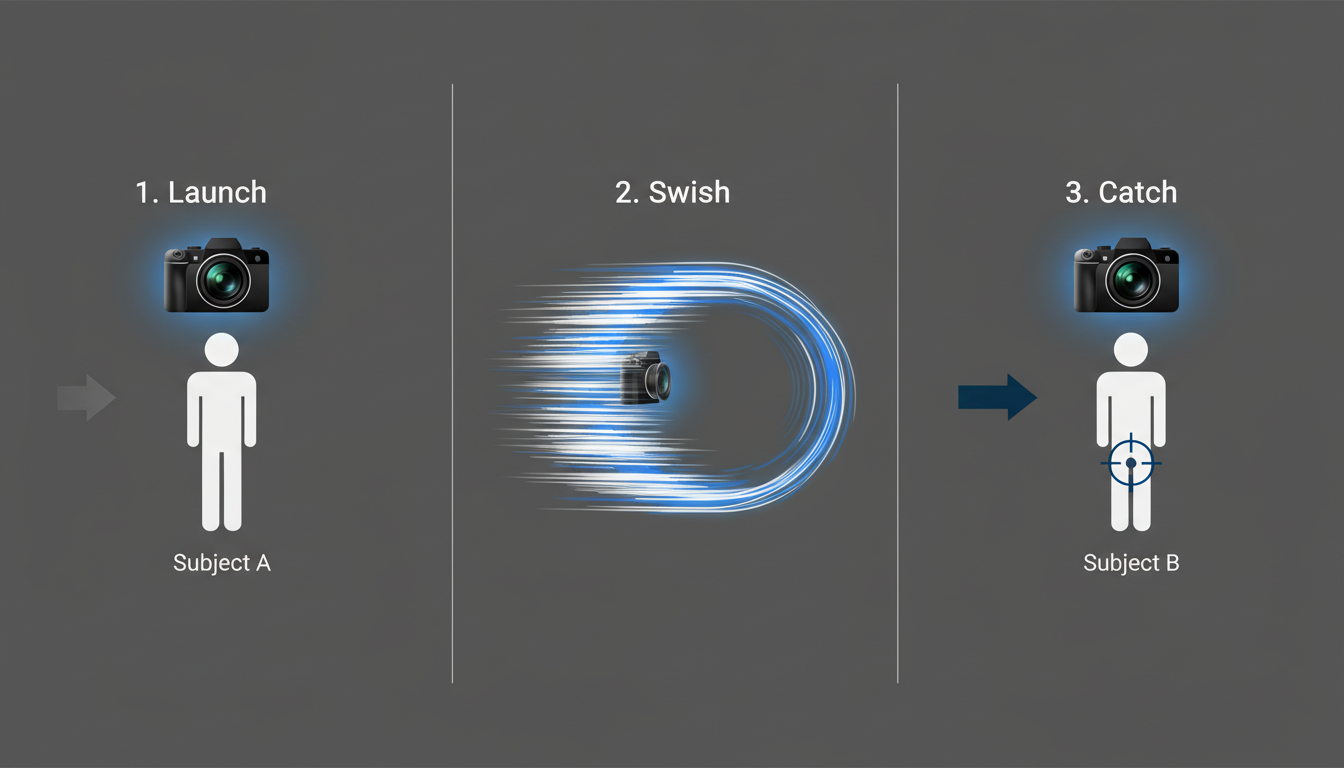
Phase 1: The Launch (Subject A & Initial Rotation)
The first phase establishes a highly detailed anchor subject (Subject A) to give the model a solid baseline before the motion begins. Without a clear starting point, the model will struggle to establish depth and geometry, leading to immediate warping. Once the scene is anchored, we use active, directional verbs to initiate the movement. Commands such as "sudden violent camera whip right" or "rapid camera snap" act as physical triggers, instructing the model to immediately initiate a high-velocity rotation along the horizontal axis.
Phase 2: The Swish (Motion Blur & Directional Vectors)
The middle phase of the protocol is where most AI generations fail. To prevent the model from trying to render recognizable objects mid-pan—which inevitably leads to morphing—we must inject physical camera terms that force realistic artifacting. We instruct the model to treat these intermediate frames as a streak of light, color, and texture. Prompts must include terms like "heavy directional motion blur," "horizontal streaking," and "momentary loss of focus." By explicitly defining the visual noise as a camera artifact, the model understands that Subject A is being swept out of frame, not transformed.
Phase 3: The Catch (Subject B & Deceleration)
The final phase manages the camera's arrival at its destination. The model needs a highly specific target to resolve the latent noise back into a coherent image. We prompt a sudden stop using terms like "abrupt deceleration," "camera snaps into sharp focus," or "instant stabilization." Immediately following this deceleration command, we define Subject B with high contrast and sharp detail. This tells the model exactly how to reconstruct the geometry as the motion blur dissipates, ensuring a clean, crisp landing.
Model-Specific Adaptations: Tailoring the Protocol
Different AI video models interpret kinetic energy and camera physics through distinct architectural lenses. For example, some models rely heavily on text comprehension, while others respond better to specific motion parameters and vector inputs. To execute a flawless whip pan, you must adapt the Kinetic Whip Pan Protocol to the specific model you are targeting.
For creators looking to push Wan2.1's engine to its limits, mastering the kinetic vector protocol is essential for maintaining spatial coherence during high-speed camera rotations. Wan2.1 requires highly structured directional commands to prevent the background from warping. Conversely, when working with Hailuo AI, pairing your whip pan prompts with a structured kinetic translation workflow ensures the model respects physical boundaries instead of warping the geometry. Hailuo's physics engine excels at high-fidelity translation, but it requires rigid boundaries to avoid melting details during high-velocity sweeps.
| AI Video Model | Primary Strength | Recommended Prompt Modifiers | Optimal Motion Settings |
|---|---|---|---|
| Runway Gen-3 Alpha | High temporal consistency and environmental rendering. | "Extreme horizontal motion blur, rapid pan right, instant focus snap." | Motion scale: 7-9. Use camera control pan sliders if available. |
| Luma Dream Machine | Fluid camera transitions and organic movements. | "Whip pan transition, high-velocity streak, camera lands on [Subject B]." | Standard settings; rely heavily on sequential prompt structuring. |
| Wan2.1 | Excellent vector-based movement and geometric tracking. | "Rapid 180-degree camera sweep right, heavy motion blur, sharp stop." | High motion weight; explicitly define start and end compass directions. |
| Hailuo AI | Realistic physics engine and natural lighting transitions. | "Sudden camera whip pan, horizontal light streaks, instant stabilization." | Use Image-to-Video mode with a high-contrast starting frame. |
Overcoming the 'Morphing' Trap: Advanced Coherence Strategies
Even with precise prompting, complex scenes can still trigger latent morphing. To combat this, advanced filmmakers utilize Image-to-Video (I2V) workflows. By feeding the AI model a highly detailed starting frame of Subject A, you establish a solid geometric baseline. Using an initial image to anchor your shot is a highly reliable way to prevent latent morphing, a technique detailed extensively in our guide to mastering Google Veo's image-to-video engine. From this anchored baseline, the model can dedicate its entire computational budget to executing the physical camera sweep rather than inventing the initial scene details from scratch.
Another highly effective strategy is leveraging multi-prompt sequencing tools, such as the Multi-Shot Sequence Protocol. This method allows you to define the start and end states of the camera sweep as separate keyframes, forcing the AI to compute the transitional "swish" frames as a logical bridge rather than a single chaotic generation. Additionally, combining your text prompts with native camera control settings—such as pan, roll, and zoom sliders—provides a physical vector constraint that guides the latent space along a precise mathematical path. This hybrid approach guarantees that the model respects the physical trajectory of the camera, greatly reducing the likelihood of geometry drift or sudden character transformations.
The Filmmaker's Checklist: Prompted Whip Pan vs. Post-Production Swish
While prompting a native whip pan in AI yields incredibly organic results, it is not always the most efficient choice for every production. Filmmakers must weigh the benefits of native physical simulation against the absolute control offered by traditional post-production editing techniques. At Montagea, our production workflows often combine native AI camera movement with traditional editing techniques to achieve seamless, studio-grade sequences.
To help you decide which path to take for your next project, use this practical decision-making framework:
- Choose Native AI Prompting When:
- You need realistic lighting changes and dynamic parallax shifts across the environment during the sweep.
- The background lighting or color of Subject A's environment must physically bleed into and illuminate Subject B's space during the transition.
- You want the camera's physical movement to feel organic, with minor, realistic imperfections in speed and focus.
- Choose Post-Production Swish When:
- You require frame-accurate control over the exact timing of the transition.
- You are working with highly complex characters or proprietary assets where character consistency must remain perfectly intact.
- The transition occurs between two radically different art styles or historical eras that confuse the AI's spatial logic.
By integrating the Kinetic Whip Pan Protocol into your production pipeline, you bridge the gap between AI generation and physical cinematography. Whether you choose to generate the sweep natively or polish it in post-production, understanding the underlying camera physics allows you to maintain creative control, delivering high-velocity, cinematic sequences that feel intentional, polished, and distinctly professional.
Why does my AI whip pan prompt look like a cheap cross-dissolve instead of a real camera sweep?
AI models naturally favor temporal consistency, meaning they prefer slow, predictable frame-to-frame changes. If your prompt does not explicitly demand mechanical camera artifacts like "heavy horizontal motion blur" and "rapid horizontal camera snap," the model will attempt to morph or dissolve Subject A into Subject B to keep the generation stable. To fix this, use the three-phase Kinetic Whip Pan Protocol to force physical camera rotation and directional streaking.
Which AI video generator handles high-speed camera movements like whip pans the best?
Currently, Wan2.1 and Runway Gen-3 Alpha handle high-speed camera movements exceptionally well when paired with precise vector commands. Wan2.1 excels at maintaining geometric boundaries under rapid rotation, while Runway Gen-3 Alpha provides realistic motion blur and environmental rendering. Hailuo AI is also a strong competitor when utilizing a structured image-to-video workflow to anchor the physics.
How do I prevent my characters from morphing into each other during a fast camera pan?
The most effective way to prevent character morphing is to avoid naming or describing intermediate objects in the middle of your prompt. Instead, instruct the model to treat the middle frames as a streak of light, color, and texture. Additionally, utilizing an Image-to-Video (I2V) workflow to anchor Subject A, combined with a highly detailed description of Subject B's sharp landing, forces the model to resolve the latent noise into two distinct characters separated by a physical sweep.
Should I prompt a whip pan in the AI model or create it in Premiere during post-production?
Prompt a native whip pan when you need realistic lighting bleeds, environmental parallax, and organic camera imperfections. Choose a post-production split-cut and directional blur in Premiere or DaVinci Resolve when you require frame-accurate control or absolute character consistency. Many professional workflows at Montagea combine both approaches, generating high-velocity plates natively and slicing them with matching directional blur in post-production.



