
The Veo I2V Prompt Engine: Mastering Physics, Parallax, and Cinematic Camera Control in Google's Video Model
Stop treating AI video generation like a lottery. Discover the precise, three-tiered prompting framework that unlocks Google Veo's powerful physics engine and spatial awareness for flawless image-to-video execution.
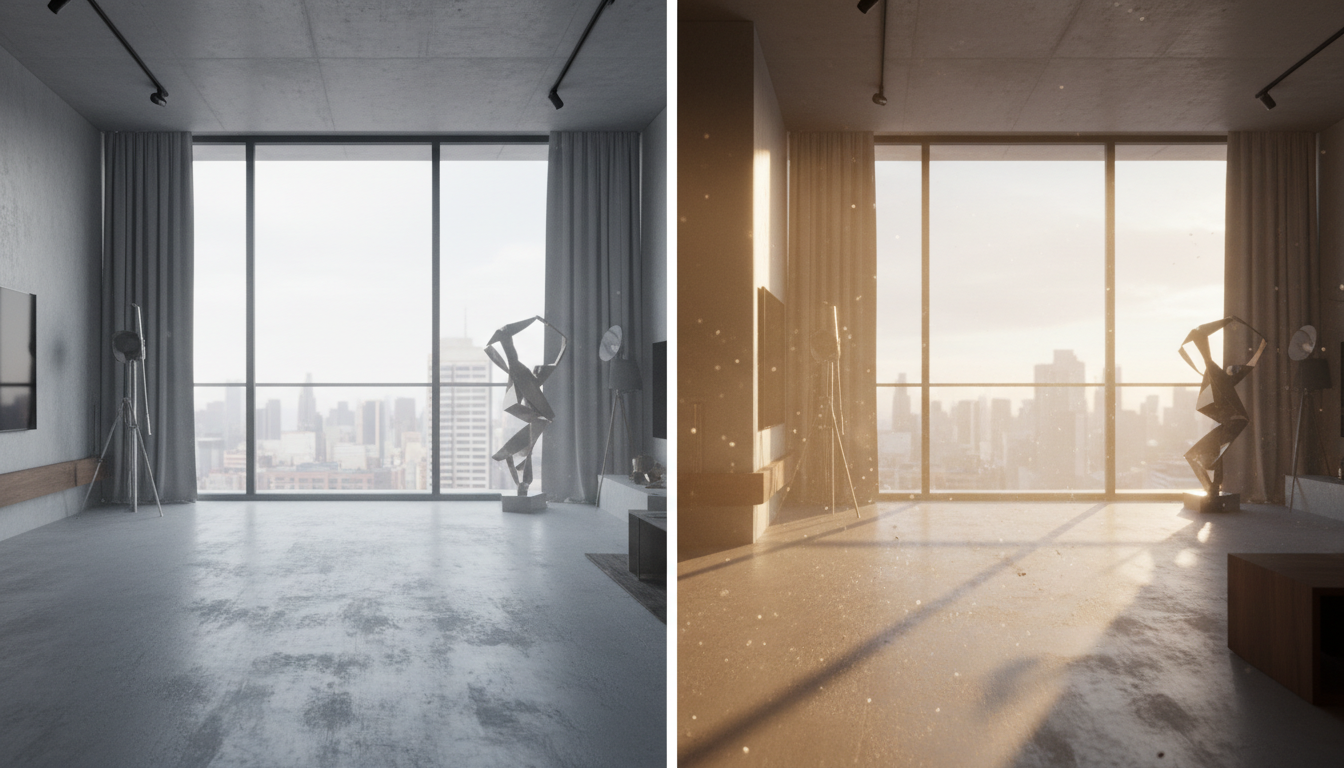
For many video creators, image-to-video (I2V) generation has long felt like an exercise in frustration—a high-stakes lottery where a static frame is fed into an AI generator, only for the output to warp, melt, or dissolve into chaotic pixel soup. While early generative video models treated the input image as a loose suggestion, Google Veo introduces a fundamental shift in spatial awareness and physical simulation. When directed with technical precision, Veo behaves less like an automated animation filter and more like a highly predictable virtual camera crew and physics engine.
At Montagea, we approach AI filmmaking from a cinematography-first perspective. To get the most out of Google Veo's advanced spatial engine, you must move away from conversational, descriptive prompting and instead adopt a structured vocabulary of physical forces, material densities, and camera choreography. By understanding how the model translates static visual data into a simulated three-dimensional space, you can consistently generate high-fidelity, production-ready cinematic sequences.
The Physics-First Paradigm of Google Veo's I2V Engine
To master Veo's I2V engine, it is critical to understand that it does not simply warp pixels along 2D motion vectors. Instead, Veo attempts to construct a temporary, volumetric 3D understanding of the source image's geometry, depth, and material properties. It analyzes the spatial relationships between foreground and background elements, calculates implied weight, and maps out how light should interact with surfaces as they move.
This structural understanding allows Veo to excel at lighting continuity and shadow preservation. When a camera pans across a scene, shadows do not merely slide across the screen; they recalculate dynamically based on the implied position of the light source and the physical contours of the geometry. While models like Hailuo rely on a specific kinetic translation protocol to handle high-fidelity physics, Google Veo approaches spatial geometry with a distinct, multi-plane simulation engine that prioritizes structural rigidity and light transport over rapid, unpredictable motion.
Traditional descriptive prompting fails in Veo because it treats the scene as a flat canvas. Prompting "a car driving fast" often results in the car morphing into the road or the background stretching unnaturally. To achieve realism, you must transition to prompting "forces" rather than "actions." You must define the physical properties of the materials in motion—such as wind resistance, viscosity, tensile strength, and mass—to guide the simulator toward believable physical behavior.
Structural Prompting: The Three-Tiered Veo I2V Framework
To eliminate the trial-and-error nature of I2V generation, we use a standardized, three-tiered prompting framework. This structure separates the visual anchors of the static image from the physics of the movement and the path of the camera, ensuring Veo executes each instruction without visual degradation.
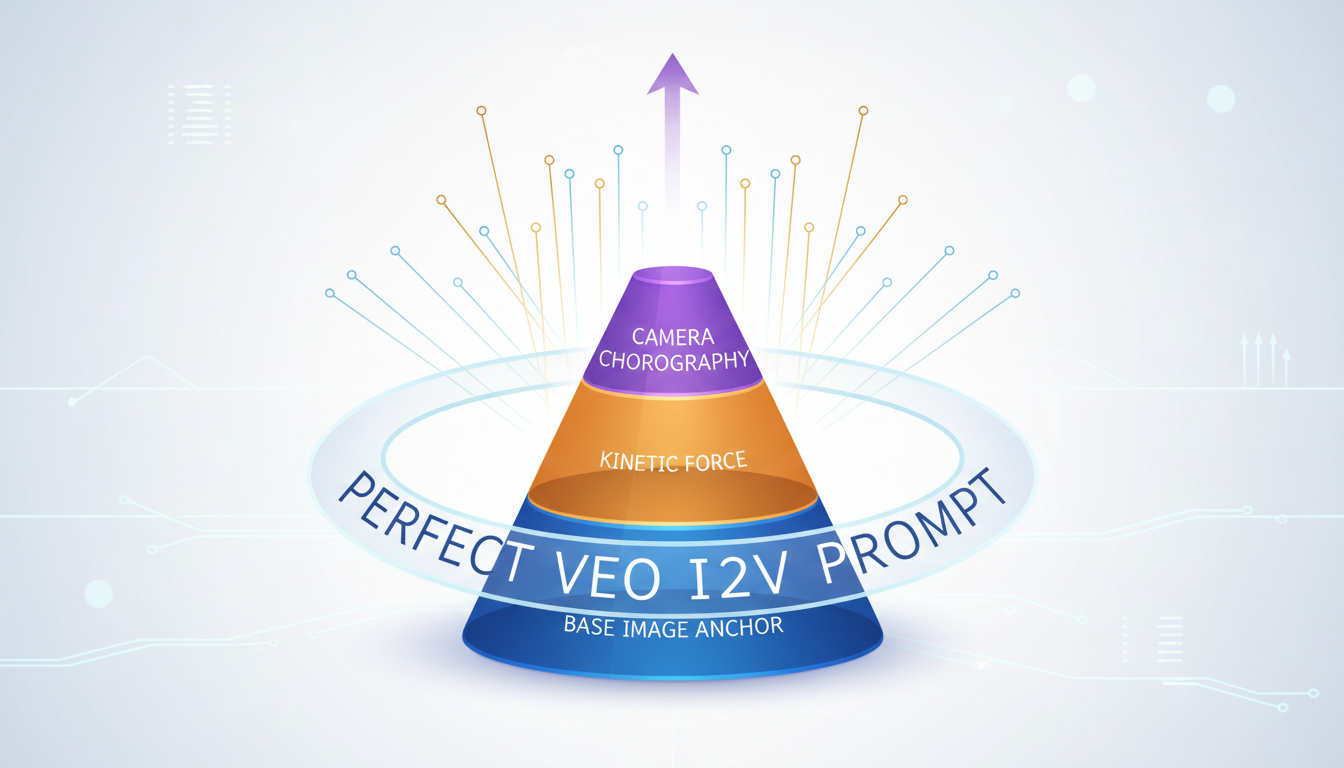
The anatomy of a professional Veo I2V prompt consists of three distinct zones:
- The Base Image Anchor: A concise, literal reference to the key elements in your source image. This acts as a stabilizer, telling Veo which structures must remain constant.
- The Kinetic Force: The specific physical action, defined by material behavior, resistance, and velocity. This dictates how objects, fluids, or characters interact with their environment.
- The Camera Choreography: Precise camera language (e.g., focal lengths, pan speeds, dolly axes) that directs the virtual lens without altering the geometry of the scene.
Balancing the Prompt Weight: Visual vs. Kinetic Elements
A common mistake is over-describing the visual elements already present in the source image. If your static image features a glass bottle on a wooden table, repeating detailed descriptions of the wood grain and glass texture in your motion prompt forces Veo to re-evaluate those pixels. This often leads to identity drift or unwanted morphing. Keep the Base Image Anchor to a bare minimum (e.g., "From the source image of the glass bottle on the table...") and dedicate 70% of your prompt weight to the Kinetic Force and Camera Choreography. This keeps the model's computational focus entirely on the physics of the motion.
Practical Veo I2V Prompt Examples for Cinematic Workflows
Applying this three-tiered framework across different production genres requires tailoring the physical vocabulary to the specific needs of the scene. Whether you are generating an architectural walk-through, a luxury product commercial, or a character-driven narrative, your prompts must reflect the real-world physical constraints of those environments.
The table below demonstrates how to translate static source images into highly controlled cinematic movements using Veo's kinetic prompt engine:
| Genre | Source Image Characteristics | Veo Kinetic Prompt Structure | Physical Output & Behavior |
|---|---|---|---|
| Architectural Walkthrough | Minimalist concrete interior with sharp lines and floor-to-ceiling windows. | "From the static interior: Concrete walls and columns remain perfectly rigid with zero geometric warping. Camera executes a slow, controlled dolly forward along the floor axis. Golden hour sunlight shifts dynamically across the floor, illuminating floating dust motes." | Flawless 3D camera translation; structural lines remain straight; shadows shift realistically based on camera angle. |
| Luxury Product Commercial | Macro shot of a wet glass perfume bottle on a dark, textured basalt stone. | "From the static product shot: High-viscosity water droplets slowly slide down the curved glass surface. Light refracts realistically through the moving liquid. Camera performs a micro-pan left with shallow depth of field, keeping focus locked on the droplets." | Accurate fluid dynamics; light bends correctly through the glass and moving water; background bokeh remains stable. |
| Character Narrative | Cinematic medium close-up of an elderly fisherman looking off-camera. | "From the static portrait: Subtle, high-fidelity micro-movements. The character slowly blinks and shifts his gaze slightly. A gentle breeze rustles the coarse fabric of his woolen collar. Facial geometry and bone structure remain perfectly consistent." | Natural, non-exaggerated human expressions; fabric movement behaves according to wind resistance; zero facial warping. |
For architectural visualization, keeping structural lines perfectly straight is paramount. This technique builds on our established framework for creating architectural animatics from static renders, adapted here specifically for Veo's unique spatial engine. By explicitly commanding the model to keep structural boundaries rigid, you prevent the liquid-like drift that often plagues AI-generated walkthroughs.
Managing Parallax and Spatial Depth in Veo
One of the clearest indicators of amateur AI video is "flat" movement, where the entire frame slides across the screen like a 2D Ken Burns effect. True cinematic camera movement relies on parallax—the visual phenomenon where objects closer to the lens appear to move faster than objects in the far distance. Because Veo constructs a temporary 3D volume of your scene, you can actively prompt this depth behavior.

To force realistic parallax, you must construct your source images with clear depth cues: a prominent foreground element (like a tree branch, a window frame, or a light fixture), a clear midground subject, and a distant background. When writing your prompt, instruct Veo to calculate the spatial distance between these layers. To achieve this, we can deploy a modified version of the split-plane protocol to force true cinematic parallax between the foreground and background.
When prompting complex camera sweeps—such as a crane down or a wide panning shot—always define the relative movement of these planes. For example: "Camera pans right. The foreground concrete pillars move rapidly across the frame, while the distant mountain range shifts slowly in the background, preserving perfect spatial depth and perspective alignment." This explicit instruction prevents Veo from flattening the image and preserves the three-dimensional integrity of the environment.
Troubleshooting Veo's Common I2V Pitfalls
Even with a structured framework, generative video can occasionally yield unwanted artifacts. When a generation fails, it is usually due to a conflict between the static image's complexity and the model's interpretation of the motion prompt. Use this troubleshooting checklist to diagnose and fix common Veo I2V errors:
- The "Freeze" Fix: If Veo ignores your motion prompt and outputs a static or near-static image, your kinetic language is too passive. Replace generic terms like "the wind blows" with active, high-impact verbs and physical constraints, such as "gale-force winds whip the fabric, causing it to ripple violently with high-frequency motion."
- The "Melt" Mitigation: If solid objects (like tables, walls, or vehicles) begin to warp or morph during camera movement, you must explicitly declare their material properties. Add structural anchors to your prompt: "rigid body physics apply," "non-deformable materials," or "structural integrity of all architectural elements remains perfectly intact."
- The "Drift" Correction: If a character's facial features or clothing change style mid-generation, the prompted motion is likely too extreme for a single seed. Reduce the camera travel speed and limit the character's movement to micro-expressions. For advanced character pipelines, pairing these prompts with a structured character turnaround sheet ensures that Veo maintains facial geometry even during complex kinetic sequences.
By treating Google Veo's image-to-video engine as a physical simulation environment rather than an unpredictable image generator, directors and editors can achieve unprecedented control over their shots. The key lies in structural prompting: anchoring the static scene, defining the physics of the movement, and choreographing the camera with professional cinematography terms.
How do I stop Google Veo from morphing objects during an image-to-video generation?
To prevent morphing, you must explicitly declare the physical rigidity of the objects in your prompt. Use terms like "rigid body physics," "non-deformable materials," and "structural integrity remains intact." Additionally, keep your Base Image Anchor brief and avoid over-describing static elements, which can cause the model to regenerate and warp them.
What is the best prompt structure for camera movement in Google Veo I2V?
The best structure is a three-tiered approach: first, reference the static source image as an anchor; second, define the kinetic forces and material behaviors in the scene; and third, specify the camera movement using professional cinematography terms (e.g., "slow camera dolly forward along the floor axis" or "subtle micro-pan left with shallow depth of field").
Can Google Veo handle realistic water and fluid simulation from a static image?
Yes, Veo is highly capable of simulating fluids because of its advanced spatial and physical understanding. To get realistic results, specify the fluid's properties in your prompt—such as viscosity, surface tension, and light refraction (e.g., "high-viscosity droplets sliding down glass, refracting light realistically").
How do I maintain character consistency when animating a static portrait in Veo?
Maintain consistency by prompting micro-movements rather than large, dramatic gestures. Use language like "subtle facial micro-movements, eyes slowly blinking, maintaining rigid facial geometry." For complex scenes, pairing your generation with a structured character turnaround sheet will help ensure the model preserves facial identity across frames.



