
The Sketch-to-Sequence Protocol: Translating Spatial Line Art into Coherent AI Video
Stop relying on text-prompt roulette. Discover how to use clean digital line art as precise spatial control maps to generate highly accurate, cinematic AI video sequences while preserving your exact compositional intent.
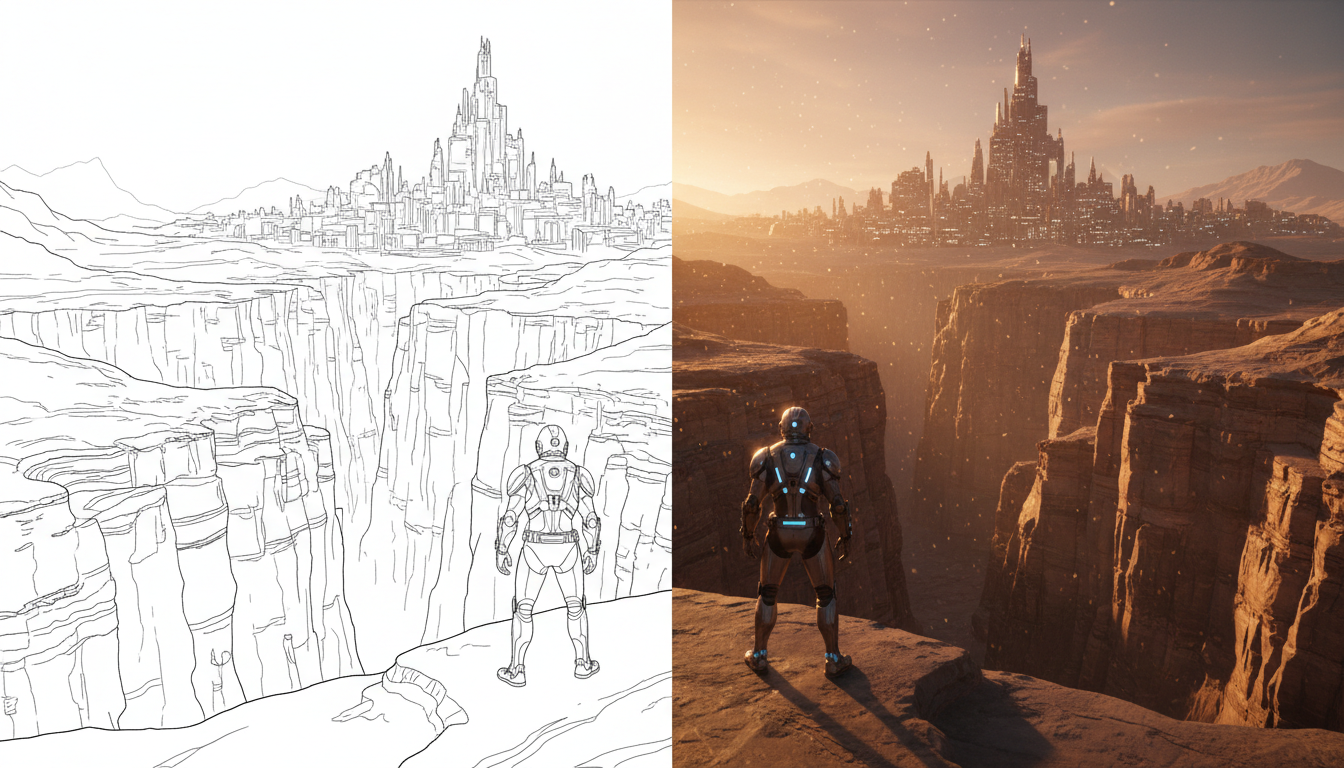
For decades, the storyboard has been the foundational blueprint of cinema, mapping out spatial relationships, camera angles, and character blocking before a single frame is shot. In the realm of AI filmmaking, however, directors have frequently been forced to trade this precise spatial control for the chaotic lottery of text-to-video prompting. Describing a complex three-way split-screen or a highly specific over-the-shoulder composition in words often yields beautiful, yet ultimately incorrect, spatial arrangements.
The solution lies in reclaiming the storyboard as a direct structural control mechanism. By translating spatial line art and hand-drawn sketches into high-contrast guiding maps, creators can force generative engines to respect compositional boundaries. This guide outlines the Sketch-to-Sequence Protocol—a repeatable, professional workflow designed to convert rough drawings into photorealistic or highly stylized cinematic sequences without losing your original artistic intent.
Beyond the Text Prompt: Why Sketches Are the Ultimate Composition Control Maps
Text prompts are inherently low-resolution when it comes to spatial coordinates. While you can prompt for a "low-angle medium shot of a pilot in a cockpit with volumetric blue light coming from the left," the AI's latent space must still make hundreds of arbitrary decisions regarding the exact angle of the pilot's seat, the geometric boundaries of the control panels, and the depth of the background. This lack of precision results in "composition roulette," where directors must run dozens of generations hoping for a lucky roll that matches their visual intent.
Temporal AI engines do not perceive drawings as art; they interpret lines, edges, and high-contrast boundaries as physical barriers and structural anchors within the latent space. When a sketch is fed into an image-to-video pipeline or a ControlNet-assisted model, the stark transitions between black ink and white space act as mathematical constraints. The generator understands that these boundaries must remain relatively static, mapping textures, materials, and lighting within these predefined zones.
By shifting from loose, descriptive prompting to structured, sketch-guided spatial control, previsualization (previz) becomes a highly predictable science. Directors can block complex camera moves, establish precise character scaling, and define environmental depth with a few strokes of a digital pen. This bridges the gap between traditional cinematic draftsmanship and generative video, turning AI from an unpredictable collaborator into a precise digital camera package.
The Sketch-to-Sequence Workflow: Preparing Your Visual Inputs
A common pitfall for filmmakers transitioning to this workflow is feeding raw, messy pencil sketches directly into an AI engine. Traditional graphite sketches contain soft gradients, stray eraser marks, and low-contrast lines that temporal models struggle to decode. To the AI, a faint pencil smudge could be interpreted as a cloud of smoke, a dirty window, or a volumetric light ray, completely derailing the intended composition.
To master the exact technical specifications for preparing your initial visual assets, refer to our comprehensive guide on how to engineer reference images for temporal AI video engines. Once you understand the baseline image requirements, you can optimize your sketches specifically for spatial guidance.
The key to a successful sketch-to-sequence input is high-contrast digital ink. By preparing your drawings with solid black lines on a stark white canvas, you establish clear, unambiguous boundaries. Furthermore, you must explicitly define the horizon line and perspective grids within the sketch. If your scene features a dramatic three-point perspective, the lines of your buildings or hallways should be drawn with clean, geometric precision. This helps the AI's depth-estimation algorithms correctly map the three-dimensional volume of the scene.
Finally, leverage negative space and solid fills to define depth layers. Instead of leaving the background empty, use a light gray wash to push it back, a mid-gray for the midground, and deep black outlines for foreground elements. This simple tonal separation provides a primitive depth map that prevents the AI from merging foreground characters into the background environment.
The Three-Stage Input Optimization Protocol
To streamline this preparation, we recommend a strict three-stage pipeline:
- The Thumbnail Draft: Sketch your initial composition freely using pencil or rough digital brushes to capture the emotion, blocking, and camera angle.
- The Vector Ink Overlay: Trace over the thumbnail with a high-contrast vector brush. Eliminate all stray lines and close any open loops in your drawing to define closed geometric regions.
- The Depth-Tonal Pass: Apply flat, distinct gray values to different planes of depth (e.g., 20% gray for far background, 50% for midground, 80% for foreground). This creates a clear hierarchy that the AI engine can instantly translate into spatial depth.
The Sketch-to-Motion Prompting Matrix: Choosing Your Engine
Not all AI video generators process sketch inputs in the same manner. Some engines excel at preserving the exact pixel-perfect geometry of your line art, while others are better at interpreting the creative spirit of the sketch to produce fluid, photorealistic motion. Choosing the right tool depends heavily on your project's technical requirements.
For a broader look at matching specific cinematic tasks to the strengths of individual generators, explore our framework on the multi-model shot list. When working with sketches, you generally choose between two primary pipelines: ControlNet-driven local models (such as Stable Diffusion with TemporalNet or Canny models) and commercial image-to-video platforms (like Runway Gen-3, Kling, or Hailuo).
When prompting with a sketch as your visual anchor, your text prompt should not describe the composition again—the sketch already handles that. Instead, focus the text on describing textures, surface materials, lighting direction, and camera movement. For example, if your sketch shows a futuristic vehicle on a road, your prompt should read: "A sleek carbon-fiber hypercar driving on wet asphalt, cinematic golden hour lighting, reflections on the wet ground, 8k resolution, photorealistic." This allows the AI to focus its generative power on rendering the scene within the geometric boundaries established by your drawing.
| Sketch Complexity | Target Cinematic Style | Optimal AI Video Engine | Workflow Approach |
|---|---|---|---|
| Simple Line Art (Clean outlines only) | Stylized, 2D Animation, or Anime | Stable Diffusion (ControlNet Canny/Lineart) | Local render control with high structural adherence. |
| Detailed Shading (Tonal depth values) | Photorealistic, Cinematic Sci-Fi/Drama | Runway Gen-3 Alpha / Kling AI (Image-to-Video) | High-fidelity rendering; interprets shading as volumetric lighting. |
| Multi-Layered Composites (Separate foreground/background) | Complex VFX, Action Sequences, Parallax | Hailuo AI / Kling AI with Motion Brushes | Precise motion control over isolated frame elements. |
Overcoming Temporal Drift: Maintaining Structural Coherence Across Frames
One of the most persistent challenges in sketch-to-video generation is temporal drift. While the first frame of your video may perfectly align with your original line art, subsequent frames often begin to warp. A clean rectangular building might warp into an organic shape, or a character’s face might lose its structure as the video progresses. This occurs because the AI's temporal attention mechanism prioritizes fluid motion over rigid geometric constraints.
To ensure your camera movements maintain realistic depth without warping, implement the split-plane protocol for cinematic parallax. This protocol helps segment the static and dynamic portions of your frame, preventing the entire image from dissolving into a fluid mess during camera pans or dollies.To anchor key visual elements, you can also utilize regional motion brushes. Platforms like Kling and Runway allow you to paint over specific areas of your input image to define where motion should occur. By freezing the structural boundaries of your environment (like walls, roads, and large obstacles) and applying motion brushes only to dynamic elements (such as running characters or flowing water), you preserve the integrity of your original sketch.
Additionally, structure your camera-control prompts carefully. Instead of prompting for complex, sweeping drone shots that force the engine to invent unseen angles of your sketch, stick to subtle, linear camera movements—such as slow dollies, pans, or tilts. These movements respect the flat perspective of your initial drawing while introducing believable cinematic life.
Studio Integration: Scaling Sketch-to-Video in Professional Pipelines
In professional studio environments, time is the most expensive resource. Traditional previsualization pipelines often require weeks of 3D modeling, asset rigging, and rough animation just to show a client or stakeholder the basic blocking of a complex VFX sequence. By integrating the Sketch-to-Sequence Protocol, production houses can bypass these costly initial phases, generating high-fidelity, cinematic animatics directly from director-approved storyboards in a fraction of the time.
At Montagea, we advocate for a hybrid creative model. Generative AI is not a replacement for traditional draftsmanship; rather, hand-drawn sketching is an irreplaceable superpower in the era of AI filmmaking. A director who can draw clean, structurally sound compositions will always produce more coherent, visually stunning AI video than someone relying solely on text prompts. The sketch is the ultimate steering wheel, guiding the massive rendering power of latent space with surgical precision.
To integrate these outputs seamlessly into your non-linear editor (NLE), treat each generated clip as a dynamic storyboard panel. Assemble the clips on your timeline, apply speed ramps to smooth out any temporal inconsistencies, and use traditional sound design to glue the sequence together. The result is a highly polished, cinematic animatic that carries the exact compositional intent of the director, ready for final production.
How do I keep my character consistent when converting a sketch to AI video?
To maintain character consistency, use a hybrid input method. Alongside your structural sketch, provide a high-quality character reference sheet (using an IP-Adapter or character-consistent model) and explicitly describe the character's key features, clothing, and colors in the text prompt. This ensures the engine maps the correct identity onto the sketch's silhouette.
Which AI video generator is best for rough hand-drawn storyboard sketches?
If your sketches are rough or messy, commercial image-to-video platforms like Runway Gen-3 or Kling AI are highly forgiving. They interpret the rough lines as a general compositional guide rather than strict boundaries, filling in the gaps with photorealistic detail. For strict geometric adherence, local Stable Diffusion pipelines with ControlNet are superior.
Do I need clean line art, or do messy pencil sketches work for AI video?
While messy pencil sketches can work, they often introduce unwanted artifacts, as the AI may interpret graphite smudges as smoke, dust, or physical objects. For professional, predictable results, we highly recommend tracing your rough sketches to create clean, high-contrast digital line art before generation.
How do I control the camera movement when starting from a static sketch?
Control camera movement using a combination of text-based camera prompts (e.g., "slow camera pan left," "dolly in") and the built-in camera control UI of your chosen generator. Keep movements subtle and linear; extreme camera rotations will force the AI to invent unseen angles, which often leads to geometric warping and temporal drift.



