
How to Build a Collaborative AI Filmmaking Portfolio: Showing Your Exact Scene Contributions
As AI filmmaking transitions to team-based pipelines, solo prompting portfolios are losing value. Learn how to structure your portfolio like a technical case study, showing exact scene contributions, engine-specific choices, and collaborative revisions.
To build a credible collaborative AI filmmaking portfolio, you must present your work as structured technical case studies rather than a collection of isolated, single-prompt clips. This requires documenting your exact role, the original scene brief, your engine-specific model choices, and the specific iteration cycles you executed based on directorial feedback. Clearly distinguishing your individual contribution prevents misattribution, builds professional trust, and demonstrates your readiness to work within a modern, team-based production pipeline.
Moving Beyond the Solo Prompt: Why Collaborative Portfolios Matter
Hiring managers, creative directors, and studio producers are looking for technical specialists who understand pipeline integration. While solo, unconstrained generations can showcase general aesthetic taste, they do not prove that a creator can deliver specific visual assets under tight creative constraints. In professional environments, AI video generation is rarely a solo endeavor; it is a collaborative effort requiring coordination across directors, editors, and technical artists.
Working on collaborative platforms like Montagea—where teams split stories into scenes and invite a crew to render shots—mirrors traditional film production pipelines. Showing that you can claim an open scene, interpret a specific prompt or style guide, and deliver a matching render proves you are a valuable crew member. To showcase this effectively, your portfolio must demonstrate how you fit into a structured creative hierarchy, showing how you maintained visual continuity and worked alongside other contributors. Understanding The Script-Splitting Protocol helps frame your work as a deliberate, modular contribution to a larger creative vision by showing how screenplays are divided into independent scene briefs for different contributors.
The Scene-Level Case Study: How to Document Your Specific Contribution
Instead of displaying a montage of unrelated shots, structure your portfolio around scene-level case studies. This approach treats each shot as a solved technical problem, showing potential clients exactly how you work.
The "Before and After" Framework
Begin each case study by presenting the raw creative input alongside your final output. Show the original scene brief, the director's script segment, and any keyframe images or style references you were handed. Displaying the initial constraints next to your finished render immediately highlights your ability to translate abstract creative direction into concrete visual assets.
Documenting Engine-Specific Decisions
With co-creation platforms like Montagea offering access to multiple rendering engines—including Kling, WAN, Seedance, Veo, Grok, MiniMax H3, Runway, and Gemini Omni—creative teams can select the best engine for each shot. Your portfolio should explicitly explain your subjective rationale for choosing a specific model to solve a particular visual challenge. Rather than claiming universal technical superiorities, focus on how your testing guided your selection for that specific project scenario:
| Visual Challenge | Engine Choice | Project-Specific Rationale (Illustrative Example) |
|---|---|---|
| Complex character action in an alleyway | Kling | Selected after comparative testing to match the director's specific request for wet stone reflections and fluid physical motion. |
| Atmospheric dusk landscape with a jade pendant close-up | Veo | Chosen to maintain visual consistency with the high-contrast concept art provided in the scene brief. |
| Dynamic tracking shot through a forest | MiniMax H3 | Selected to execute the precise panning speed and camera tracking requested in the director's revision notes. |
Showing the Iteration Trail
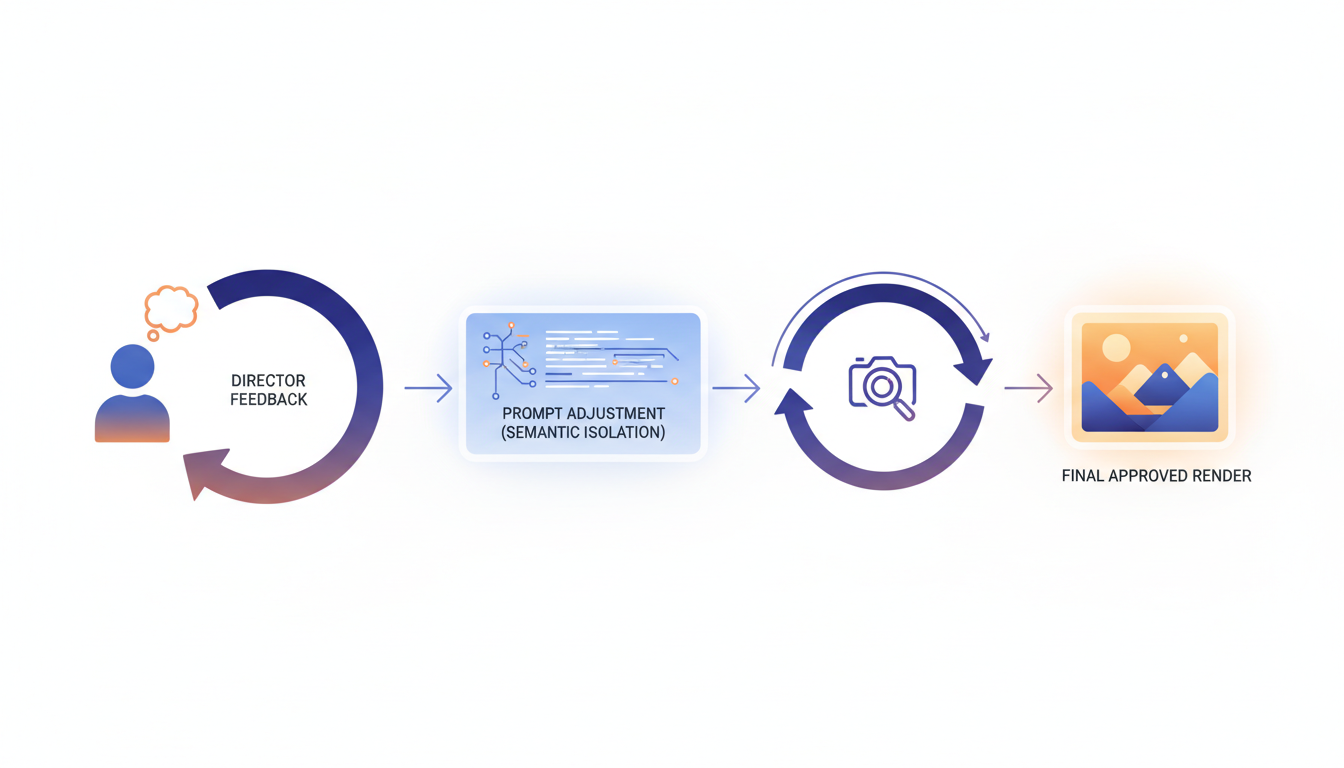
A polished final render only tells half the story. To prove your technical depth, document your revision process. Outline the initial feedback you received from the director and show how you adjusted your prompts, seed values, or reference images to correct the shot. Utilizing The Director's Translation Protocol provides an excellent framework for showing how you parsed subjective creative notes and executed precise technical prompt adjustments without losing the core creative intent.
If a model ignored a specific instruction in your initial render, explain how you debugged the prompt. Referencing techniques like The Semantic Isolation Protocol demonstrates your ability to isolate variables and systematically fix non-compliant prompts, proving to potential clients that you rely on methodical workflows rather than random generation luck.
Clear Attribution and the Ethics of Co-Creation
Honesty is the foundation of a professional portfolio. Over-claiming credit on a collaborative project is a quick way to damage your reputation in the filmmaking community. You must establish clear, transparent boundaries between your work and the work of your collaborators.
- Specify Your Exact Role: Avoid vague titles like "AI Creator." Instead, use precise industry terms such as "Lead Scene Renderer," "Character Consistency Specialist," or "Technical Director." Following The Collaborative Credit Protocol is a highly effective way to establish clear role attributions in multi-contributor AI productions, ensuring everyone's contributions are accurately represented.
- Acknowledge Shared Assets: If the director provided a custom-trained LoRA, a specific base character model, or pre-approved concept art, state this clearly. Explain how you utilized these shared assets to maintain visual continuity without claiming you created them from scratch.
- Demonstrate Resource Efficiency: Professional teams operate under strict resource constraints. Show potential clients that you know how to work efficiently by applying The Co-Generation Protocol to prevent asset redundancy and minimize credit waste during collaborative rendering. Highlight your ratio of successful renders to total generations to prove you work within a production budget.
A Practical Portfolio Template for AI Video Contributors
To present your collaborative work effectively, use a consistent, structured format for each project entry. The following four-part layout ensures that your technical skills and collaborative capabilities are front and center.
The 4-Part Case Study Layout
- Project Overview: A brief description of the film, the overall creative direction, the director, and your specific role on the crew.
- The Scene Brief: The specific creative prompt, technical constraints (e.g., aspect ratio, frame rate, duration), and the visual style guide you were assigned to follow.
- Technical Execution: A breakdown of the models, custom prompts, seed parameters, and post-generation tools (such as upscalers or frame-interpolation models) you used to build the scene.
- The Collaborative Outcome: A side-by-side comparison of the initial generation and the final approved render, detailing how you implemented director feedback to achieve the final look.
When selecting projects to feature, prioritize high-substance, short-form content over long, unpolished pieces. Utilizing The 30-Second AI Film Blueprint is an effective way to build high-substance micro-shorts that showcase rapid execution and precise narrative pacing. Finally, whenever possible, link directly to your shared collaborative workspace or production timeline. This provides verifiable proof of your hands-on involvement, showing potential clients exactly how you communicate, receive feedback, and deliver assets in a live production environment.
Should I include the exact prompts I used in my collaborative portfolio?
Yes, including key prompt segments or structural frameworks is highly recommended. It demonstrates your technical understanding of semantic isolation and prompt weights. However, if you signed a non-disclosure agreement (NDA) or are working with proprietary studio assets, always obtain permission or generalize the prompts to protect proprietary workflows.
How do I present my work if the collaborative AI film was never fully finished?
You can still present unfinished projects by framing them as proof-of-concept case studies. Focus on the specific scenes or shots you successfully completed, outlining the initial creative brief, your technical execution, and the assets you delivered to the team before production halted.
Is it acceptable to list AI model names as 'co-creators' in my portfolio credits?
No. AI models should be listed under your technical tools or pipeline specifications (e.g., "Generated using Veo and Kling"), rather than credited as human co-creators. Keep your credit attribution focused on the actual crew members, such as directors, prompt engineers, and editors, to maintain professional industry standards.



