
How to Build a Consistent AI Influencer: A Video Production Workflow
Discover how to move beyond one-off profile avatars to build a professional production setup for a recurring virtual creator. This guide outlines how to establish a consistent character bible, leverage motion-transfer workflows, and launch a three-post starter video campaign.
Building a consistent AI influencer requires shifting your mindset from casual prompting to structured digital asset management. To prevent a virtual creator's face and body from morphing across different scenes, you must establish a centralized "character bible" consisting of high-resolution reference images and pass them through image-to-video (I2V) and motion-transfer workflows rather than relying on pure text-to-video models. This guide outlines how to build a reusable identity brief, generate standard reference assets, and execute a three-post starter production workflow using professional video co-creation techniques.
Designing the Character Bible: Identity Briefs and Reference Sets
Standard text prompts fail at character consistency because generative AI models introduce slight variations in facial structure, lighting, and proportions with every new generation. A dedicated "character bible" solves this issue by serving as the single source of truth for your digital actor's visual identity.
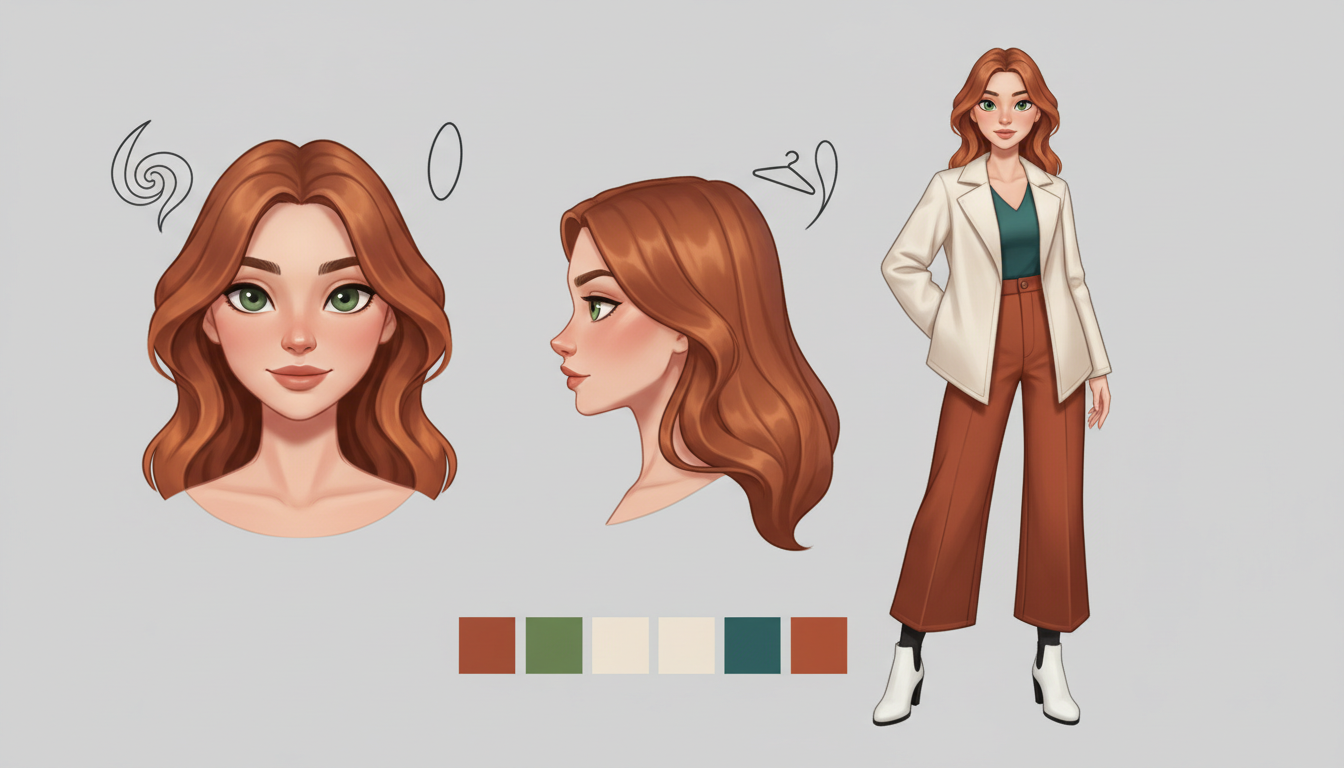
To generate a standardized reference set, produce two core images: a high-resolution, front-facing portrait (close-up) and a full-body shot, both captured against a neutral, solid white or light-gray background. These clean backgrounds minimize visual noise, making it easier for video generation models to isolate the character's geometry later.
When designing your character, rely on physical anchor details that remain highly recognizable across different AI models. These anchors include:
- Distinct Hairstyles: Specific cuts and colors (e.g., "asymmetrical blunt bob, copper-toned hair") are easier for neural networks to track than generic descriptions like "brown hair."
- Specific Eye Colors and Shapes: Defining precise features (e.g., "almond-shaped hazel eyes") helps keep close-up shots consistent.
- Signature Clothing and Accessories: A consistent pair of minimalist wire-frame glasses or a specific style of jewelry provides a persistent visual anchor that helps viewers recognize the character instantly.
For collaborative projects, keeping these reference files in a shared directory ensures that everyone involved in the production pipeline has access to the same visual assets. When planning your production steps, platforms like Montagea feature AI creative agents that can pick the best AI models and plan the generation steps for your video projects, which you can then integrate into your broader character workflow.
Template: Virtual Creator Identity Brief
| Brief Component | Illustrative Specification Template |
|---|---|
| Character Name | Elena Vance |
| Visual Archetype | 20-something tech-minimalist, professional and creative |
| Facial Anchors | Sharp jawline, subtle freckles across the bridge of the nose, almond-shaped hazel eyes |
| Hair Details | Textured, dark copper-toned blunt bob with a sharp middle part |
| Signature Wardrobe | Neutral-toned linen crewnecks, minimalist silver hoop earrings |
| Reference Asset IDs | portrait_ref_01.png, fullbody_ref_01.png |
Motion Transfer and Video Generation Workflows
Once your reference assets are locked in, animating them cleanly is the next challenge. Pure text-to-video generation often struggles to maintain facial identity across dynamic movements. Instead, utilizing an image-to-video approach is critical. You can compare the advantages of starting with an image asset versus a text prompt for visual consistency to see how starting with a high-quality, static reference image anchors the character's facial geometry far more reliably than text alone.
Motion-transfer tools, such as Higgsfield's Genjutsu engine, take this a step further. They allow you to upload a 3-to-30-second driving video—a real human performing a gesture or movement—and apply that exact camera motion, timing, and posture directly to your reference character. This preserves facial identity while delivering natural human movement.
To swap outfits, products, or locations without losing the core motion and facial structure, use region-based inpainting or depth-guided image-to-video models. This lets you isolate the background or the clothing while keeping the influencer's face and body movement completely intact. This technique is highly effective for product integrations, allowing you to place a new product in the character's hands while maintaining their unique physical identity.
To make the generated footage look like authentic, user-generated content (UGC) rather than a polished but sterile digital render, avoid robotic, linear camera paths. You can learn how to prompt natural camera breathing and avoid digital glitches to mimic authentic handheld camera movements, slight shakes, and natural autofocus adjustments.
The Three-Post Starter Production Blueprint
To launch your virtual creator, execute a structured three-post starter campaign designed to build audience familiarity while testing your workflow's consistency across different environments and shot types.
Post 1: The Direct-to-Camera Introduction
Focus on generating a clean, high-resolution talking-head video. Use a stable facial-preservation model with a driving audio track for lip-syncing. Ensure your prompt includes natural micro-expressions, such as subtle blinking, slight head tilts, and organic mouth movements, to break any uncanny stiffness. Keep the camera close and the background simple to emphasize the character's facial consistency.
Post 2: The Lifestyle Walk-and-Talk
Place your creator in an organic outdoor setting, such as a sunlit city park or a bustling café terrace. Guide the motion using a handheld camera prompt to introduce natural camera breathing. By combining a motion-transfer clip of a real person walking with your static full-body reference image, you can generate a highly realistic sequence where the character moves naturally through a 3D space with realistic lighting and shadow interaction.
Post 3: The Micro-Drama or Product Showcase
Transition into a dynamic narrative style. If you are developing content for mobile-first platforms, you can explore our guide on setting up a vertical video workflow for narrative content to optimize your framing, resolution, and aspect ratios. Integrate smooth visual pacing by masterfully planning and prompting clean jump transitions when swapping the creator’s outfits or shifting between indoor and outdoor locations.
Workflow Comparison: Pure Text vs. Image + Motion Transfer
| Feature / Workflow | Pure Text-to-Video Prompting | Image-to-Video + Motion Transfer |
|---|---|---|
| Facial Consistency | Low (morphs between generations) | High (anchored by reference image) |
| Movement Control | Unpredictable (dependent on text interpretation) | Precise (driven by real-world motion clips) |
| Outfit/Asset Swaps | Extremely difficult (requires complex negative prompting) | Seamless (via localized inpainting or depth-mapping) |
| Production Speed | High trial-and-error rate | Predictable, repeatable multi-shot workflow |
How do I prevent the AI influencer's face from morphing or changing between shots?
To prevent facial morphing, always start your video generation with a consistent, high-resolution reference image (Image-to-Video) rather than raw text prompts. Additionally, utilize advanced conditioning models like IP-Adapter, ControlNet, or motion-transfer engines that lock in facial geometry and features across frames. Maintaining a consistent seed number and using a structured "character bible" with specific physical anchors also minimizes variation.
Can I use my own voice or a custom voice clone for the virtual creator?
Yes. You can record your own voiceovers or use professional AI voice cloning platforms to generate custom audio files. Once the audio is finalized, you can import it into a lip-syncing or facial animation engine to synchronize the virtual character's mouth movements and facial expressions with the spoken track, creating a seamless talking-head video.
What are the ethical considerations and disclosure requirements for publishing AI influencer content?
When publishing virtual creator content, transparency is key. Many major social media platforms require you to apply an "AI-generated" or "synthetic media" label to your posts. Clearly disclosing that the character is a virtual or AI-generated creator in your profile bio or post captions helps maintain audience trust, satisfies FTC disclosure guidelines, and prevents misleading viewers.



