
How to Use WAN Image-to-Video: Preparing Assets and Workflows
Learn how to configure Alibaba's WAN image-to-video model. This guide covers preparing source image aspect ratios, structuring motion prompts, and managing workflows for video generation.
Using Alibaba’s WAN model for image-to-video generation allows creators to animate static images, though achieving predictable results typically requires careful preparation of your source assets and clear motion prompts. To deploy WAN, creators can orchestrate it within Montagea, where the AI creative agent Gigi helps coordinate the model alongside your production timeline.
Understanding WAN Image-to-Video Workflows
Alibaba's WAN is a video generation model designed to process visual inputs and text prompts. When deploying WAN for image-to-video (I2V) workflows, creators often evaluate different integration methods depending on their rendering budget and quality needs.
Managing video generation models manually can complicate your pipeline. Within the Montagea ecosystem, the AI creative agent Gigi simplifies this orchestration. Instead of writing custom API wrappers or manually swapping configurations, you can let Gigi automatically select the optimal model—whether that is WAN, Veo, or Kling—to match your project's technical specifications and rendering timeline, ensuring a unified production workflow.
Preparing Your Source Images for WAN
The quality of a WAN video generation is heavily dependent on the layout and preparation of your source image. Passing an incorrectly sized image can force the model to crop or stretch the asset, which may lead to visual distortion.
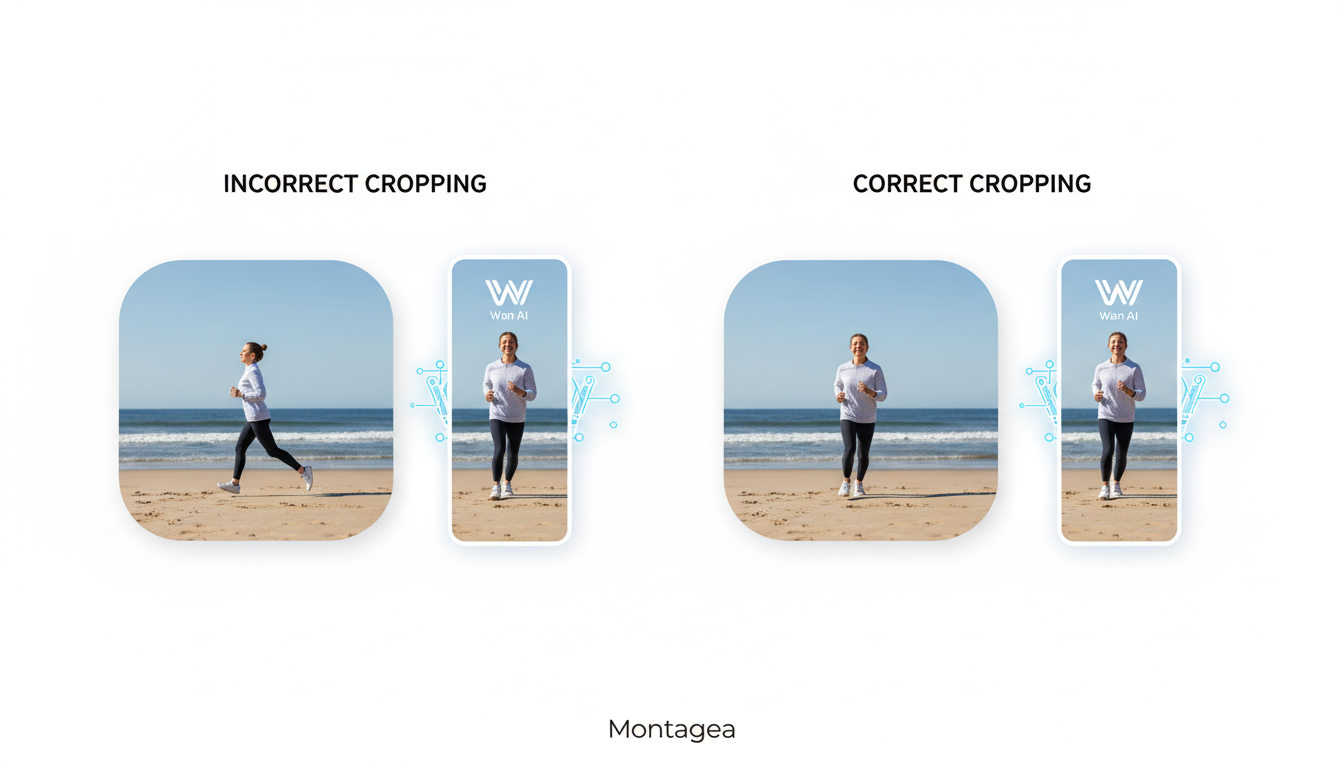
To help ensure clean motion, format your starting images according to these general recommendations:
- Aspect Ratio Alignment: Crop your source images to standard video ratios such as 16:9 or 9:16 before processing. Using an unsupported aspect ratio can lead to unexpected cropping or scaling during the generation process.
- Subject Composition: Place your primary subject clearly within the frame. Busy, cluttered backgrounds can sometimes complicate depth estimation, causing background elements to merge with your subject during movement.
- Contrast and Clarity: Ensure sharp focus on key details. Soft-focus or heavily compressed inputs can sometimes resolve as blurry artifacts once motion is applied.
For creators building sequential scenes across multiple shots, consistency is key. To maintain visual continuity across your project, learn how to prepare consistent frame packs for image-to-video workflows.
Writing Motion Prompts for Predictable Camera Control
Unlike text-to-video generation, where the prompt must describe the entire scene from scratch, WAN image-to-video prompts should focus primarily on describing motion. The starting image already establishes the characters, colors, and setting; your prompt simply directs the camera and the action.
To achieve more predictable results, structure your motion prompts using a clear formula: [Subject action] + [Camera movement] + [Environmental changes]. Avoiding subjective adjectives like "cinematic," "stunning," or "photorealistic" can help prevent the generator from producing static frames.
Consider the following comparison of motion prompts:
- Weak prompt (illustrative): "A beautiful sports car driving fast down a cinematic street at night."
- Descriptive motion prompt (illustrative): "The red sports car accelerates forward along the wet asphalt. The camera tracks low to the ground behind the rear tire, capturing water droplets splashing off the wheels. Streetlights reflect dynamically across the metallic body."
The descriptive prompt provides clear instructions that the model can translate into motion. If you are working with existing video sequences instead of static starting frames, refer to our guide on preparing video inputs for Wan Animate. For broader pre-production planning, matching your prompts to a structured screenplay can streamline your entire workflow; see our guide on AI script writing for production.
Troubleshooting Common WAN Generation Failures
Even with clean assets and precise prompting, AI video generation occasionally produces artifacts. Use the following troubleshooting matrix to diagnose and address common failure states in WAN:
| Issue | Root Cause | Adjustment |
|---|---|---|
| The Melting Subject | The generation settings or prompt instructions may introduce excessive motion, causing the physical boundaries of the subject to dissolve. | Adjust the motion settings or simplify the motion prompt to stabilize the subject. |
| The Static Frame | The prompt relies too heavily on static descriptions, or the motion instructions are too subtle to initiate movement. | Rephrase the prompt using active verbs (e.g., "runs," "slides," "rotates") to clearly define the action. |
| Anatomical/Structural Distortion | The source image contains ambiguous depth cues or does not match the native aspect ratio. | Crop the source image cleanly, ensure the subject has clear edges, and verify that the input resolution matches the target endpoint. |
By systematically adjusting these elements, you can transition your creative assets from static concepts into fluid video sequences ready for post-production.
How can I extend the duration of a WAN video generation?
The duration of generated clips depends on the specific platform configuration and integration settings. To create longer sequences, individual clips can be extended or stitched together during post-production or managed through an orchestration tool like Montagea.
Can I use WAN for commercial video production?
Commercial usability depends on the licensing terms provided by Alibaba and the terms of service of your chosen platform or integration partner. Always verify the specific licensing agreements before releasing commercial work.
How does WAN handle text rendering inside generated videos?
Text within an image-to-video workflow can often warp or distort during camera movements. For clean text rendering, it is generally recommended to add logos, titles, and graphic overlays during post-production rather than baking them into the initial generation.



