
The Acro-Flight Protocol: Prompting High-Velocity FPV Drone Dynamics in AI Video
Stop generating slow, stabilized aerial shots. Learn how to prompt for genuine acrobatic FPV flight physics, extreme roll rates, and high-velocity proximity parallax in AI video engines.
The adrenaline-fueled visual style of FPV (First-Person View) drone footage has become a staple of modern action cinema, car commercials, and extreme sports documentaries. However, when filmmakers attempt to replicate this high-velocity, acrobatic motion in AI video generators, they are often met with frustratingly static results. Standard aerial prompts almost always yield slow, mechanically stabilized "tripod-in-the-sky" shots that resemble a heavy commercial drone hovering on a calm day.
To break past these default "safe" camera behaviors, filmmakers must understand how AI models interpret movement. At Montagea, we have developed a systematic prompting framework designed to bypass standard camera trajectories. By targeting the physics of acrobatic flight—specifically roll-axis banking, hyper-proximity parallax, and wide-angle optical distortion—you can force engines like Runway Gen-3, Luma Dream Machine, and Kling to render convincing, high-speed FPV sequences.
The Physics of FPV: Why Standard Drone Prompts Fail
To prompt FPV dynamics successfully, you must first understand why AI video generators default to slow, level-horizon movements. Traditional commercial drones use 3-axis mechanical gimbals specifically engineered to isolate the camera from the drone’s physical tilt and roll. The AI's training data is saturated with this style of footage: perfectly stable, flat-horizon landscapes. When you include the word "drone" in an AI video prompt, the model automatically pulls from this massive dataset of stabilized, linear camera paths, keeping the horizon line rigidly locked to the horizontal axis.
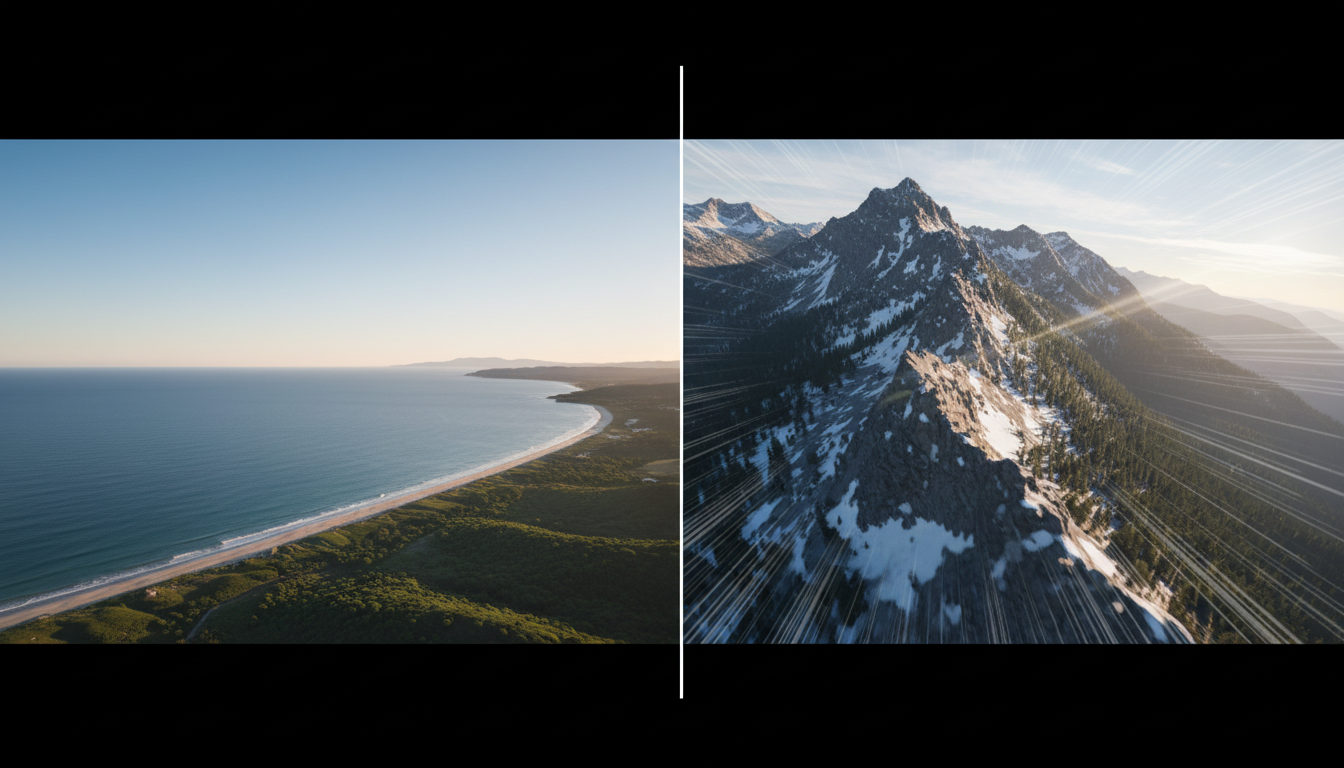
True acrobatic FPV flight operates in "Acro mode," where the camera is rigidly locked to the frame of a highly agile quadcopter. When an FPV pilot turns, the drone doesn't just pan; it banks aggressively, tilting the horizon line. When it accelerates, it pitches downward, pointing the camera toward the ground. AI models struggle with this because aggressive rotation changes the spatial geometry of the scene too rapidly, which the engine often interprets as a linear zoom or a simple pan, causing the edges of the frame to warp, stretch, or completely melt.
While FPV focuses on forward-facing kinetic energy, mastering other aerial angles like the Nadir perspective offers a completely different way to control vertical camera axes. However, to capture the raw velocity of FPV, we must replace generic aerial terminology with descriptors that replicate the physical forces of acrobatic flight.
The Acro-Flight Prompting Framework
The Acro-Flight Protocol relies on a three-tier prompting formula: Lens Canvas, Kinetic Attitude, and Environmental Proximity. By structuring your prompts to define the optical properties of the camera first, followed by the physical attitude of the flight path, you prevent the AI from defaulting to a stabilized gimbal look.
Crafting the Core Prompt String
To establish the visual canvas, you must specify a wide-angle action lens. Standard lenses do not convey speed effectively in AI generations. Use terms like "ultra-wide 120-degree FOV", "slight fisheye lens distortion", and "GoPro-style action camera aesthetics". This tells the AI to stretch the perspective at the periphery of the frame, which naturally enhances the sensation of forward velocity.
Next, define the flight attitude using precise aerodynamic verbs rather than camera direction terms. Instead of prompting "camera flies forward," use physics-driven phrasing such as "banking sharply into a hard left turn, tilting the horizon 45 degrees," "diving vertically down a concrete facade," or "executing a rapid barrel roll." This forces the AI to calculate the spatial transformation of the environment relative to a rotating, high-velocity viewpoint.
| Prompting Goal | Standard "Cinematic Drone" Prompt (Fails) | Acro-Flight Protocol Prompt (Succeeds) |
|---|---|---|
| Mountain Dive | Cinematic drone shot flying down a mountain ridge, beautiful landscape. | FPV drone dive, vertical descent down a steep mountain ridge, ultra-wide 120-degree FOV, high-velocity proximity flight, horizon tilting aggressively, motion blur. |
| Urban Gap Crossing | Drone flying through an abandoned warehouse window, smooth shot. | FPV acrobatic quadcopter footage, squeezing through a narrow concrete window gap, sharp yaw correction, extreme camera roll, high-speed spatial parallax, action camera aesthetics. |
| Forest Slalom | Drone shot weaving through trees in a dense forest. | Low-altitude FPV proximity flying, banking sharply around pine trees, hugging the forest floor, rapid altitude adjustments, dynamic motion lines, fisheye lens distortion. |
Prompting for Proximity and High-Speed Spatial Parallax
The sensation of speed in FPV footage is entirely dependent on proximity. A drone flying at 60 miles per hour at an altitude of 500 feet feels incredibly slow because there are no nearby static objects to create visual reference points. The same drone flying at 30 miles per hour just two feet off the ground feels blindingly fast because of spatial parallax—the visual phenomenon where foreground objects move across the frame much faster than background objects.
To force the AI to render this high-speed depth interaction, you must prompt for dense, multi-layered environments. Specify obstacles that sit directly in the camera's path, such as "brushing past pine needles," "weaving between concrete pillars," or "skimming inches above an asphalt road." To master how foreground and background elements interact during high-speed passes, developers can pair these FPV techniques with our guide on the Split-Plane Protocol for cinematic parallax.
Additionally, you must guide the AI's rendering of motion blur. Without explicit instructions, AI video engines often attempt to keep every frame perfectly sharp, resulting in a choppy, staccato look that ruins the illusion of speed. Incorporate phrases like "natural motion blur on the outer edges of the frame," "dynamic optical flow," and "streaking textures on the ground plane" to smooth out the high-velocity transition and maintain visual coherence.
Troubleshooting the 'Wobbly Camera' and Geometry Warping
When prompting high-speed FPV, you will inevitably encounter "jelly-effect" warping, tearing horizons, and sudden, unnatural camera deceleration. These issues occur because the AI is attempting to generate complex physical movement and new spatial details simultaneously from text alone. Text-to-video (T2V) pipelines are particularly prone to these errors.
To solve this, shift your workflow to an Image-to-Video (I2V) pipeline. By starting with a high-quality, statically rendered seed image, you lock in the perspective lines and environmental geometry before the motion is generated. For creators using image-to-video engines to seed their FPV shots, applying the Kinetic Translation Protocol ensures the physics engine respects the initial frame's geometry.
When preparing your seed image, ensure it features strong perspective lines—such as a long corridor, a narrow canyon, or a straight road—that converge on a clear vanishing point. This gives the AI model a clear path of travel to follow. If the camera still displays a wobbly, floating movement, add negative prompts or weight adjustments to suppress "slow-motion drift," "floating artifacts," or "cinematic gimbal stabilization." This forces the engine to commit to a singular, aggressive vector of forward motion.
Integrating FPV Shots into Your Montagea Post-Production Workflow
Even the most advanced AI-generated FPV shots can look slightly "too perfect" or sterile straight out of the generator. Real FPV footage is chaotic, noisy, and physically grounded. To make your AI generations indistinguishable from real-world footage, you must treat the AI output as a raw kinetic plate that requires finishing in post-production.
First, introduce high-frequency micro-vibrations. Real FPV quadcopters experience constant, subtle vibrations from their high-RPM motors, especially during sharp turns or when fighting wind shear. Adding a subtle, high-frequency camera shake in your editing suite immediately breaks the smooth, artificial perfection of the AI camera path. Combine this with digital lens artifacts—such as a slight chromatic aberration at the edges of the frame, subtle lens dirt, and occasional digital static glitching to simulate analog FPV video feeds.
The absolute critical element that sells an FPV shot, however, is sound design. Without audio, high-speed movement feels completely detached from reality. Layer a deep, rushing wind shear track underneath the high-pitched whine of brushless electric motors. Add a sudden, bass-heavy "whoosh" sound effect right as the camera passes close to a wall or tree trunk to emphasize the spatial proximity. At Montagea, our production philosophy champions hybrid workflows. We believe AI is a powerful tool for generating impossible kinetic plates, but it requires the grounding of real-world soundscapes, meticulous color grading, and precise editorial timing to truly capture the viewer's attention and deliver a visceral cinematic experience.
How do I stop my AI FPV drone prompt from looking like a slow helicopter shot?
To avoid the slow, stabilized helicopter look, replace generic terms like "drone shot" or "aerial view" with specific acrobatic flight terms. Use phrases like "high-velocity FPV quadcopter footage," "banking sharply into turns," "horizon tilting 45 degrees," and "low-altitude proximity flying." Additionally, specify an "ultra-wide 120-degree FOV lens" with "natural motion blur" to visually emphasize the speed of the camera's path.
Which AI video generator is best for high-speed FPV drone simulation?
Runway Gen-3 and Luma Dream Machine currently lead in handling fast spatial transitions and high-speed camera paths. However, to get the cleanest results without geometric tearing, it is highly recommended to use an Image-to-Video (I2V) workflow on these platforms. Seeding the generator with a wide-angle, deep-perspective image anchors the environmental geometry far better than Text-to-Video generation.
How do I prompt a barrel roll or flip in AI video?
Prompting complex 360-degree rotations requires explicit physical instructions. Instead of just writing "the drone does a flip," use precise trajectory language: "First-person view, camera executes a rapid 360-degree barrel roll along the roll axis while maintaining forward velocity down a narrow canyon." Combining the axis of rotation with the environment's structure helps the AI calculate the changing horizon line.
Why does the ground look warped or blurry in my AI drone generations?
This warping (often called the jelly effect) occurs when the AI struggles to calculate the changing textures of the ground at high speeds. To fix this, ensure your prompt includes instructions for "natural motion blur on the outer edges" and "sharp focus on the center vanishing point." Using an Image-to-Video workflow with a high-contrast, well-defined ground texture in the seed image also dramatically reduces warping.



