
AI Video Scene Dependency Planning: Sequencing and Parallelizing Shot Generation
Generating AI video shots chronologically often leads to style drift and character inconsistency. Discover how to use a hero-to-dependent mapping framework to sequence your shots and parallelize production across a remote crew.
To maintain visual consistency and prevent style drift in AI video production, shots must be generated in order of asset dependency rather than story chronology. By establishing a "Style Anchor" (or hero reference frame) first, creators can use this master image as a consistent reference input for all dependent character portraits, medium shots, and action sequences. This structured approach allows remote crews to parallelize generation across different AI engines without losing control over lighting, color grading, and character assets.
Why Chronological Generation Fails in AI Video Production
In traditional filmmaking, shooting schedules are dictated by location availability, actor schedules, and lighting conditions. In AI filmmaking, however, the primary constraint is visual continuity. Generating shots chronologically (from Scene 1 to Scene 20) is a recipe for cumulative style drift and character degradation. AI video models do not possess a persistent memory of your creative vision; each new prompt is generated from scratch unless guided by a unified visual anchor.
Most high-quality AI video workflows rely on image-to-video (I2V) generation. This technique requires a highly consistent, static seed image to yield predictable camera movements and character behaviors. If you generate Shot A (a medium shot of a character) and then try to generate Shot B (a close-up) chronologically without a shared reference, the character's facial features, clothing, and the background lighting will inevitably drift. To prevent this, directors must draft precise prompts that establish "Anchor Shots"—master environment frames and character turnarounds—before any motion is generated. To translate your creative vision into these initial prompts effectively, crews can implement a structured scene brief to ensure all foundational assets align with the director's intent.
The Hero-to-Dependent Mapping Framework
To organize an AI-assisted shoot, production teams should categorize shots into three distinct tiers based on asset dependency. This framework ensures that high-fidelity style parameters flow downward, keeping all subsequent generations visually aligned.
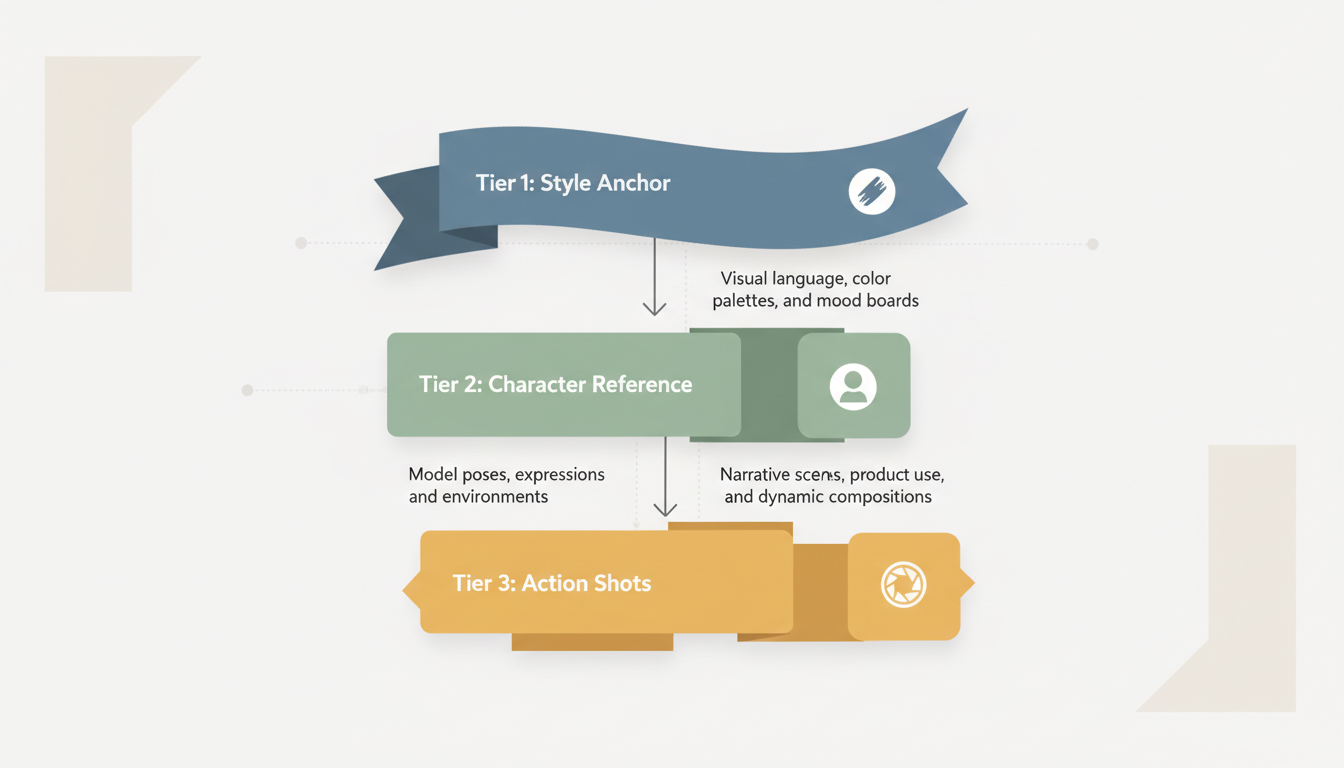
The Three Tiers of Asset Dependency
- Tier 1: The Style Anchor. This is a high-fidelity, non-moving master shot or mid-shot that defines the scene's core aesthetic. It establishes the authoritative lighting, color palette, architectural details, and baseline character design. It is generated first as a static image.
- Tier 2: The Character Reference. Using the Style Anchor as an image-to-image (I2I) prompt or reference input, creators generate highly detailed close-up portraits and turnaround frames. These establish consistent facial geometry and wardrobe details before physical action is introduced.
- Tier 3: Action and Dependent Shots. These are the dynamic camera movements, cutaways, and close-ups that ingest Tier 1 and Tier 2 outputs as image prompts or control inputs. Because they are grounded by existing visual reference files, the AI engines can render high-motion sequences with minimal hallucination.
By mapping dependencies this way, you can easily plan transitions between wide master shots and close-up cutaways while maintaining a cohesive look. For a deeper look at managing continuity during complex camera movements, production teams can plan transitions carefully across different engines to maintain visual flow.
A Practical Dependency Map Example
Consider a sci-fi alleyway scene. Instead of generating the shots in story order, the production team maps the assets and shots as follows:
| Generation Order | Shot Type | Dependency Tier | Required Inputs | Output Deliverable |
|---|---|---|---|---|
| 1 (First) | Master Wide Shot (Alleyway) | Tier 1: Style Anchor | Text-to-Image (T2I) prompt detailing neon lighting, wet asphalt, and color palette. | Static hero frame defining the environment's visual baseline. |
| 2 | Character Portrait (Protagonist) | Tier 2: Character Reference | T2I prompt + Tier 1 image as style reference to match the neon lighting. | Static character turnaround and close-up headshot. |
| 3 | Alleyway Establishing Pan | Tier 3: Action / Dependent | Tier 1 Master Wide Shot + Image-to-Video (I2V) motion prompt. | 4-second establishing tracking shot. |
| 4 | Protagonist Running | Tier 3: Action / Dependent | Tier 2 Character Reference + Tier 1 Style Anchor + I2V action prompt. | 4-second dynamic action shot of the protagonist running down the alley. |
Parallelizing the Generation Pipeline Across a Remote Crew
Once the dependency map is established, the production can be parallelized across a remote creative team. While traditional scheduling is linear, an asset-dependent workflow allows multiple artists to work on different Tier 3 shots simultaneously, provided the Tier 1 and Tier 2 assets are locked and distributed.
This is where collaborative platforms like Montagea become essential. On Montagea, a director can write a story and split it into distinct scenes, turning a complex screenplay into discrete, manageable tasks.
Once the script is split, the director can establish the Tier 1 Style Anchors. The remaining scenes can be set as "Open Scenes" on Montagea, where remote contributors can claim them and render each shot using engines like Kling, WAN, or Veo. To help maintain a unified aesthetic across these different engines, production teams can distribute the approved Tier 1 and Tier 2 reference frames to contributors, who can then use them as image-to-video inputs during their generation process.
What should I do if a dependent shot fails to match the hero reference frame's lighting?
If a dependent shot drifts in color or lighting, you can use the hero reference frame as a style guide in your AI engine's image-to-image (I2I) parameters, setting the style strength higher. Alternatively, you can apply a unified LUT (Look-Up Table) in post-production or use color-matching tools in your editing software to align the dependent shot's color grading with the Style Anchor.
How do I handle character consistency when parallelizing shots across different AI video models?
To keep characters consistent across models like Kling, WAN, or Veo, always distribute identical Tier 2 character reference frames (turnarounds and close-ups) to all contributors. Instruct the team to use the same character seed images and specific seed numbers where applicable. Additionally, keeping the text prompts for character descriptions highly standardized across all scenes helps minimize model-specific variations.



